Customer and Company Flags
Customer and company flags provide a flexible classification system for organizing and categorizing your customers and companies. These flags work similarly to product flags but are specifically designed for customer and company management within Norce Commerce.
Overview
Customer and company flags serve multiple purposes:
- Customer classification: Organize customers into specific categories or segments
- Company categorization: Group companies based on business criteria
- Unified system: The same flags can be active for both customers and companies simultaneously
- Business logic: Enable targeted rules and processes based on flag assignments
Flag Groups
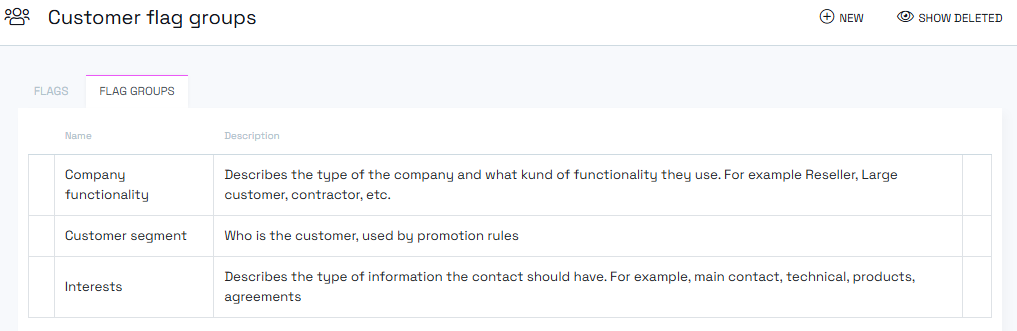
Flag groups organize and control how customer and company flags behave within your system.
Group Management
The groups tab displays:
- A complete list of your flag groups
- Group names and descriptions
- Options to delete or restore groups
Creating and Editing Flag Groups
When creating or editing a flag group, you can configure:
Required Fields
- Name: Display name for the group
- Description: Optional description of the group's purpose
Group Configuration
Is Multiple
- Enabled: Allows multiple flags within the same group to be active simultaneously
- Disabled: Only one flag per group can be active at a time
Translation Support
Flag groups support multi-language translations, allowing you to provide localized names and descriptions for different markets.
Group Lifecycle Management
Deleting Groups
To remove a flag group:
- Click the "X" button on the right side of the group in the list
- Confirm your decision when prompted
- The group becomes inactive but remains in the system
Restoring Groups
To restore a deleted group:
- Click "Show deleted" to view inactive groups
- Select the group you want to restore
- Confirm the restoration
Customer and Company Flags
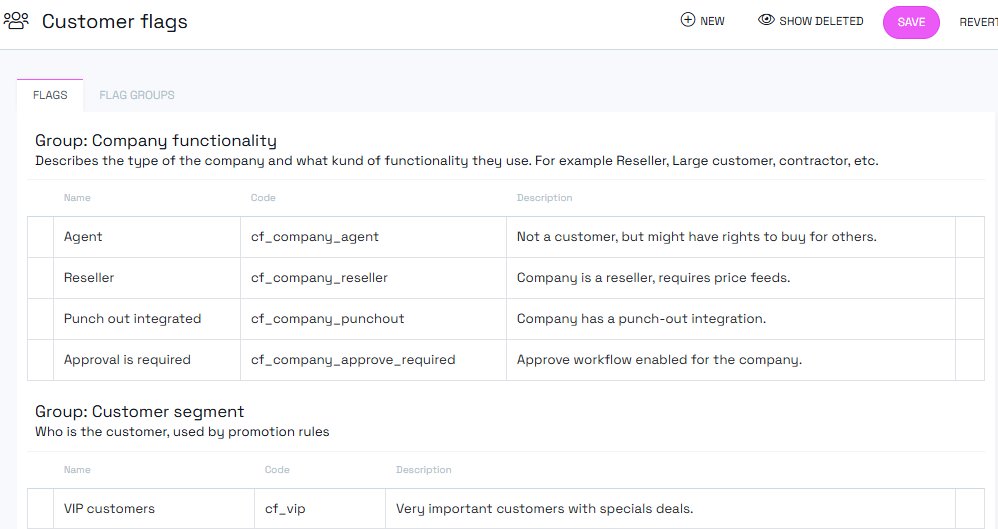
The flags tab manages the individual flags that can be assigned to customers and companies.
Creating and Editing Flags
When creating or editing a flag, you must configure:
Required Fields
- Name: Language-specific display name for the flag
- Code: Language-independent identifier (required)
- Description: Optional description of the flag's purpose
- Flag Group: Must be assigned to one of your existing groups
Flag Scope Configuration
Each flag can be enabled for:
- Customers only: Flag appears only on customer pages
- Companies only: Flag appears only on company pages
- Both customers and companies: Flag can be used for both entity types
The checkboxes you select determine where the flag will be available for assignment in the admin interface.
Working with Customer and Company Flags
Flag Assignment
Flags can be assigned to customers and companies through:
- Manual assignment in the customer or company detail pages
- Bulk operations for multiple entities
- API integrations for automated processes
Flag Visibility
The scope settings ensure flags appear in the correct locations:
- Customer flags show up on customer management pages
- Company flags show up on company management pages
- Dual-scope flags appear in both locations
Deleting and Restoring Flags
Similar to groups, individual flags can be:
- Deleted by clicking the "X" button in the flags list
- Restored using the "Show deleted" view
- Managed through soft delete functionality to maintain data integrity
Note: Customer and company flags integrate with various Norce modules and external systems. Always consider the broader impact when making structural changes to your flag configuration.