Voyado Loyalty Adapter
Overview
The Voyado Loyalty Adapter integrates Voyado Engage with Norce Checkout (NCO), enabling merchants to apply Voyado loyalty benefits to a Norce Checkout order. Voyado Engage is a customer loyalty and marketing-automation platform.
Unlike payment adapters, the Voyado Loyalty Adapter does not take payments. It participates in the checkout flow by:
- Linking a Voyado contact to the Norce Checkout order as
customer.loyalty. - Exposing the promotions and reward vouchers available for that contact in Voyado.
- Writing applied promotions and reward vouchers back to the order so that the Norce Adapter can translate them into discount line items in Norce Commerce.
The adapter is identified by the adapter id voyado_checkout_adapter and is configured per merchant/channel in Norce Checkout Admin.
Capabilities and Supported Flows
Supported Operations
| Operation | HTTP | Purpose |
|---|---|---|
| Set customer loyalty | POST /api/v1/loyalty/{orderId}/set | Validates a Voyado contact and stores it on order.customer.loyalty.id with provider = "Voyado". Returns the contact together with available promotions and reward vouchers. |
| Get promotions | GET /api/v1/promotions/{orderId} | Returns the active Voyado promotions for the contact on order.customer.loyalty.id. |
| Apply promotion | POST /api/v1/promotions/{orderId}/{promotionId}/apply | Adds the selected Voyado promotion to order.customer.loyalty.promotions. |
| Remove promotion | POST /api/v1/promotions/{orderId}/{promotionId}/remove | Removes a previously applied Voyado promotion from the order. |
| Get reward vouchers | GET /api/v1/rewardvouchers/{orderId} | Returns the available Voyado reward vouchers for the contact on order.customer.loyalty.id. |
| Apply reward voucher | POST /api/v1/rewardvouchers/{orderId}/{voucherId}/apply | Adds the selected reward voucher to order.customer.loyalty.rewardVouchers. |
| Remove reward voucher | POST /api/v1/rewardvouchers/{orderId}/{voucherId}/remove | Removes a previously applied reward voucher from the order. |
Integration Type
- Loyalty / CRM integration; not a payment or shipping adapter.
- Runs inside the normal checkout flow (not as a post-purchase notification).
- The frontend is responsible for letting the customer identify themselves in Voyado and for calling the adapter with the resulting Voyado contact id.
Limitations
- The adapter does not register receipts or transactions in Voyado. Purchase data is not pushed to Voyado by this adapter. Receipt/transaction synchronization with Voyado is currently solved by third-party integration partners such as Nexer Group's Commerce Integration Platform, not by Norce Checkout.
GET,apply, andremovefor promotions and reward vouchers all requireorder.customer.loyalty.idto be set on the Norce order first via theloyalty/{orderId}/setendpoint.- Reward vouchers require
rewardVoucherLevelsto be configured. A voucher amount that does not match any configured level fails withconfiguration-error. - Promotions without an
externalIdand without a usableECOMredemption channel value fail to apply withpromotion-external-id-missing.
Prerequisites
From Voyado
To use the Voyado Loyalty Adapter you need the following from Voyado Engage:
- A Voyado Engage tenant with API access enabled.
- A Voyado API key (sent in the
apikeyheader) that allows reading contacts, promotion assignments, and reward vouchers (api/v3/contacts/{id},api/v3/promotion-assignments,api/v3/reward-vouchers/available). - Your Voyado client identifier, used in the API URL (
https://{client}.voyado.comorhttps://{client}.staging.voyado.com).
From Norce
- Norce Checkout enabled for your Norce Commerce account.
- A configured merchant and channel in Norce Checkout Admin.
- The Norce Adapter configured on the same order so that loyalty promotions and reward vouchers can be translated into Norce Commerce discount lines.
- Norce discount
externalIdvalues that correspond to each configuredrewardVoucherLevel.maxAmount, and to any promotion that is expected to be redeemed throughECOM.
Environments
The Voyado Loyalty Adapter URLs follow the standard NCO pattern:
| Environment | Adapter URL Pattern |
|---|---|
| Production | https://{slug}.api-se.norce.tech/checkout/voyado-adapter |
| Stage | https://{slug}.api-se.stage.norce.tech/checkout/voyado-adapter |
| Playground | https://{slug}.api-se.playground.norce.tech/checkout/voyado-adapter |
Replace {slug} with your organization's slug provided by Norce.
Voyado API environments used by the adapter:
| Environment | Voyado API URL Pattern |
|---|---|
| Production | https://{client}.voyado.com |
| Staging | https://{client}.staging.voyado.com |
Replace {client} with your Voyado client identifier.
Configuration in Norce Checkout Admin
The Voyado Loyalty Adapter is configured per merchant/channel in Norce Checkout Admin. Configuration is validated against the voyado_adapter JSON schema published by the adapter.
Required configuration
| Field | Description |
|---|---|
adapter.internalUrl | Internal URL of the Voyado Loyalty Adapter, used by other Norce services. |
adapter.publicUrl | Public URL of the Voyado Loyalty Adapter, used by the storefront. |
apiSettings.apiUrl | Base URL of the Voyado Engage API. Use https://{client}.staging.voyado.com for test and https://{client}.voyado.com for production. |
apiSettings.apiKey | Voyado Engage API key. Sent as the apikey header on every outgoing call to Voyado. |
Reward voucher levels
rewardVoucherLevels maps Voyado reward vouchers to Norce discount externalId values based on the voucher amount.
| Field | Description |
|---|---|
rewardVoucherLevels[].maxAmount | Upper bound (inclusive) of the voucher amount that this level applies to. |
rewardVoucherLevels[].externalId | Norce discount externalId that is written to the order when a voucher whose amount falls within this level is applied. |
Levels are evaluated in ascending maxAmount order. The first level whose maxAmount is greater than or equal to the voucher amount wins. If no level matches the voucher amount, applying the voucher fails with configuration-error.
Example configuration:
{
  "$schema": "https://{slug}.api-se.playground.norce.tech/checkout/voyado-adapter/openapi/v1/schemas/voyado_adapter.json",
  "id": "voyado_adapter",
  "active": true,
  "adapter": {
    "internalUrl": "https://voyado-adapter.checkout.playground.internal.norce.tech",
    "publicUrl": "https://{slug}.api-se.playground.norce.tech/checkout/voyado-adapter"
  },
  "apiSettings": {
    "apiUrl": "https://yourclient.voyado.com",
    "apiKey": "***"
  },
  "rewardVoucherLevels": [
    { "maxAmount": 100, "externalId": "VOYADO_VOUCHER_100" },
    { "maxAmount": 250, "externalId": "VOYADO_VOUCHER_250" },
    { "maxAmount": 500, "externalId": "VOYADO_VOUCHER_500" }
  ]
}
Matching Voyado codes to Norce Commerce promotions
Every externalCode that the Voyado Loyalty Adapter writes to the order (from a Voyado promotion or from a rewardVoucherLevels[].externalId) must exist as a Promotion in Norce Commerce Admin. Without a matching Promotion, the order still carries the loyalty entry but no discount line item is generated in Norce Commerce.
For each expected externalCode, create a Promotion in Norce Commerce Admin with:
- Status —
Active. - Code — a unique code for the promotion (free-form, for example
RewardVoucher-600). - Requirement —
If the external discount code is <externalCode>, where<externalCode>is exactly one of:- A Voyado promotion
externalId. - The
valueof the Voyado promotion'sECOMredemption channel (whenexternalIdis empty). - A
rewardVoucherLevels[].externalIdvalue from the adapter configuration (for exampleVOYADO_VOUCHER_100orRewardVoucher-600).
- A Voyado promotion
- Effect — the discount that should be applied when the code matches (for example
THEN Discount all in basket with 600,00 SEK incl. VAT).
When a Voyado promotion or reward voucher is applied through the Voyado Loyalty Adapter, the Norce Adapter looks for a Norce Commerce Promotion whose requirement matches the externalCode written on the order and adds the corresponding discount line item to the cart. If no matching Promotion exists, no discount is applied.
Example: reward voucher Promotion in Norce Commerce Admin
A Norce Commerce Promotion that matches a Voyado reward voucher of 600 SEK (mapped by rewardVoucherLevels to externalId = "RewardVoucher-600") might look like this in Norce Commerce Admin:
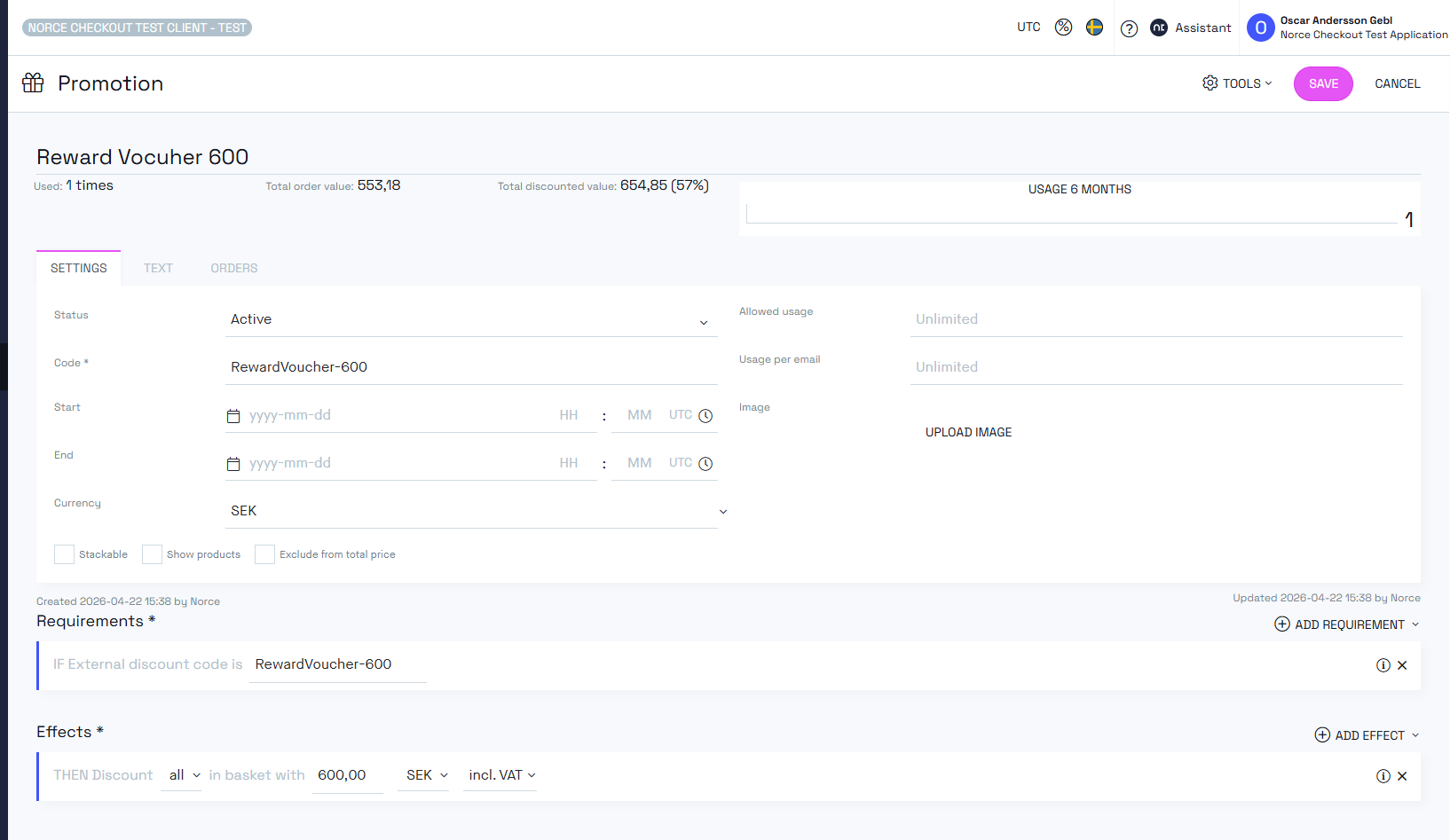
Key fields:
- Status:
Active. - Requirement:
IF External discount code is RewardVoucher-600. - Effect:
THEN Discount all in basket with 600,00 SEK incl. VAT.
Example: Voyado promotion Promotion in Norce Commerce Admin
A Norce Commerce Promotion that matches the Voyado NEWCUSTOMER promotion (whose externalCode resolves to NEWCUSTOMER either from the Voyado externalId or from the ECOM redemption channel value) might look like this in Norce Commerce Admin:
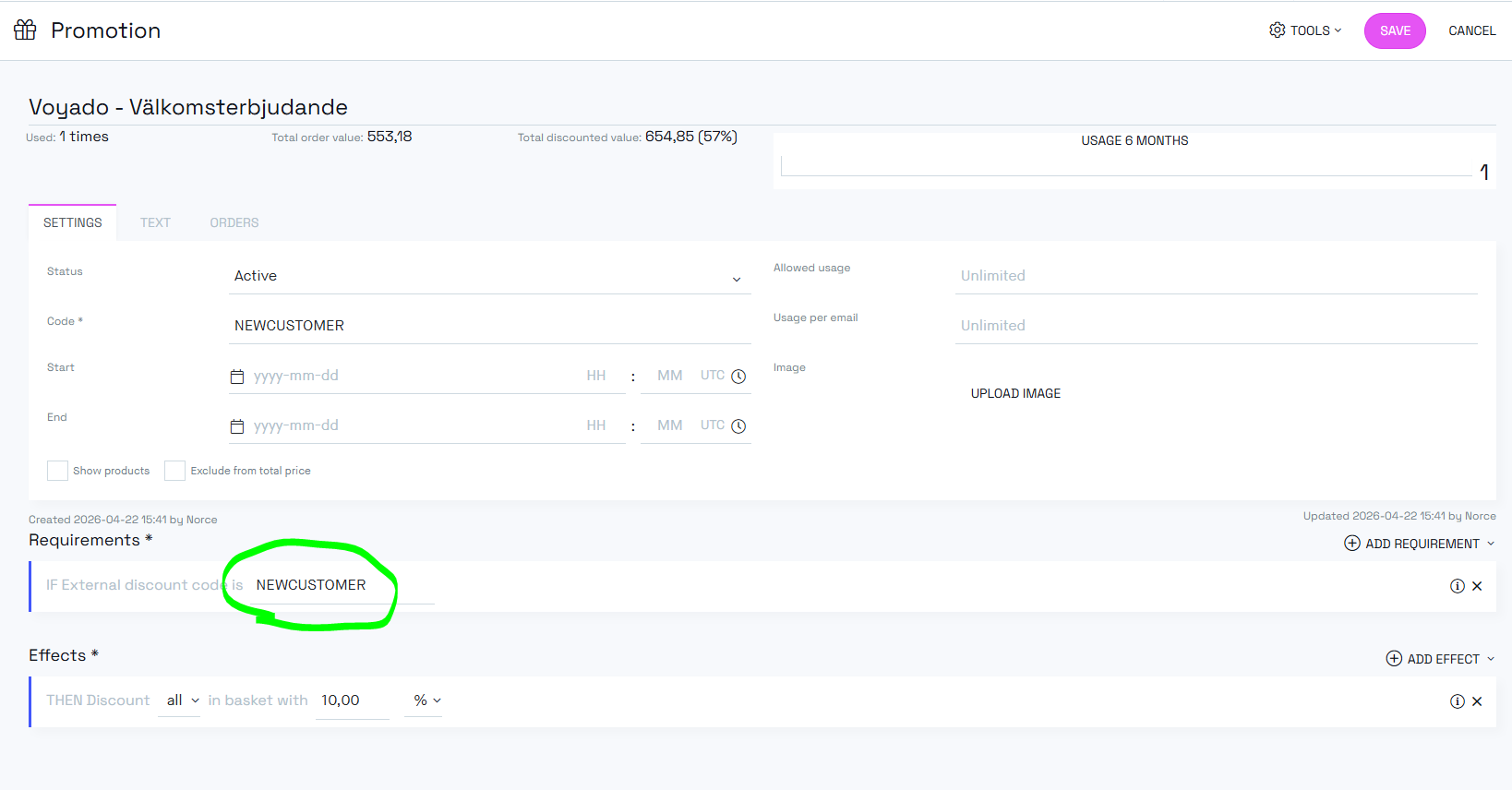
Key fields:
- Status:
Active. - Requirement:
IF External discount code is NEWCUSTOMER. - Effect:
THEN Discount all in basket with 10,00 %.
How the Voyado Loyalty Adapter uses the Norce order
The adapter reads and writes order.customer.loyalty on the Norce Checkout order:
order.customer.loyalty.id— Voyado contact id. Set byPOST /api/v1/loyalty/{orderId}/setand required by every other endpoint.order.customer.loyalty.provider— always"Voyado"when set by this adapter.order.customer.loyalty.promotions[]— list of applied Voyado promotions. Each entry contains the Voyadoid, the resolvedexternalCode, and the promotionname.order.customer.loyalty.rewardVouchers[]— list of applied reward vouchers. Each entry contains the Voyadoid,voucherNumber,name, and the Norce discountexternalCoderesolved fromrewardVoucherLevels.
Applied promotions and reward vouchers are written to the order, and the Norce Adapter then converts them to discount line items in Norce Commerce. The Voyado Loyalty Adapter itself does not modify the cart totals.
Promotion externalCode resolution
When applying a promotion, the adapter picks an externalCode to write to the order using the following rule:
- If the Voyado
Promotion.externalIdis non-empty, it is used as-is. - Otherwise, the adapter looks up the redemption channel with
type == "ECOM"on the promotion and uses itsvalue(string or number). - If neither is available, applying the promotion fails with
promotion-external-id-missing.
Reward voucher externalCode resolution
When applying a reward voucher, the adapter picks an externalCode based on the configured rewardVoucherLevels:
- The voucher's
value.amountis compared againstrewardVoucherLevelssorted bymaxAmountascending. - The
externalIdof the first level withmaxAmount >= voucher.value.amountis used. - If no level matches, applying the voucher fails with
configuration-error.
Calls to Voyado Engage
The Voyado Loyalty Adapter calls the following Voyado Engage endpoints. All calls include the configured apiKey as the apikey header.
| Purpose | Voyado endpoint |
|---|---|
| Validate Voyado contact when setting loyalty | GET api/v3/contacts/{contactId} |
| List active promotion assignments | GET api/v3/promotion-assignments?contactId={contactId} |
| List available reward vouchers | GET api/v3/reward-vouchers/available?contactId={contactId} |
A 404 response from Voyado is translated into voyado-contact-not-found.
Error Handling and Troubleshooting
Error codes
| Error code | When it is returned |
|---|---|
voyado-contact-not-found | The Voyado contact id used on the request does not exist in the configured Voyado tenant. |
voyado-promotion-not-found | The promotion id on an apply call is not in the list returned by Voyado for this contact. |
voyado-voucher-not-found | The voucher id on an apply call is not in the list returned by Voyado for this contact. |
loyalty-id-missing | The order does not have customer.loyalty.id set. Call POST /api/v1/loyalty/{orderId}/set first. |
promotion-external-id-missing | The promotion has no externalId and no usable ECOM redemption channel value, so no Norce discount code can be resolved. |
promotion-not-applied | Writing the promotion to the order failed validation on the order service. |
voucher-invalid | The reward voucher is already redeemed. |
voucher-not-applied | Writing the reward voucher to the order failed validation on the order service. |
configuration-error | The adapter configuration is missing or the voucher amount does not match any configured rewardVoucherLevel. |
voyado-bad-request | The promotion or voucher is already applied to the order, or is already redeemed in Voyado. |
Troubleshooting checklist
- Verify
apiSettings.apiUrlpoints to the correct Voyado environment (staging.voyado.comin test,voyado.comin production). - Verify
apiSettings.apiKeyis valid and has permissions for thecontacts,promotion-assignments, andreward-vouchers/availableendpoints. - Verify
order.customer.loyalty.idis present before calling promotion or reward-voucher endpoints. - Verify that Voyado promotions intended for ECOM have either an
externalIdor a non-emptyECOMredemption channel value. - Verify that
rewardVoucherLevelscovers every voucher amount used by your Voyado reward setup. - Verify that every
externalCodewritten to the order has a matching Promotion in Norce Commerce Admin whose requirement isIf the external discount code is <externalCode>. Without it, no discount line item is created in Norce Commerce even though the loyalty entry is present on the order.
Links and References
Norce Checkout API References
Norce Checkout Overview
- Norce Checkout Introduction
- Working with Norce Checkout
- Loyalty Adapters Overview
- Voyado Loyalty Adapter Developer Guide
External Documentation
- Voyado Engage (contact Voyado for API documentation)