Norce Platform Adapter
The Norce Adapter (norce_adapter) is the platform adapter that connects Norce Commerce to Norce Checkout. It serves as the bridge between the Norce Commerce basket and order model and the Norce Checkout orchestration layer, enabling access to all payment, shipping, and voucher provider adapters.
How the Norce Adapter Works
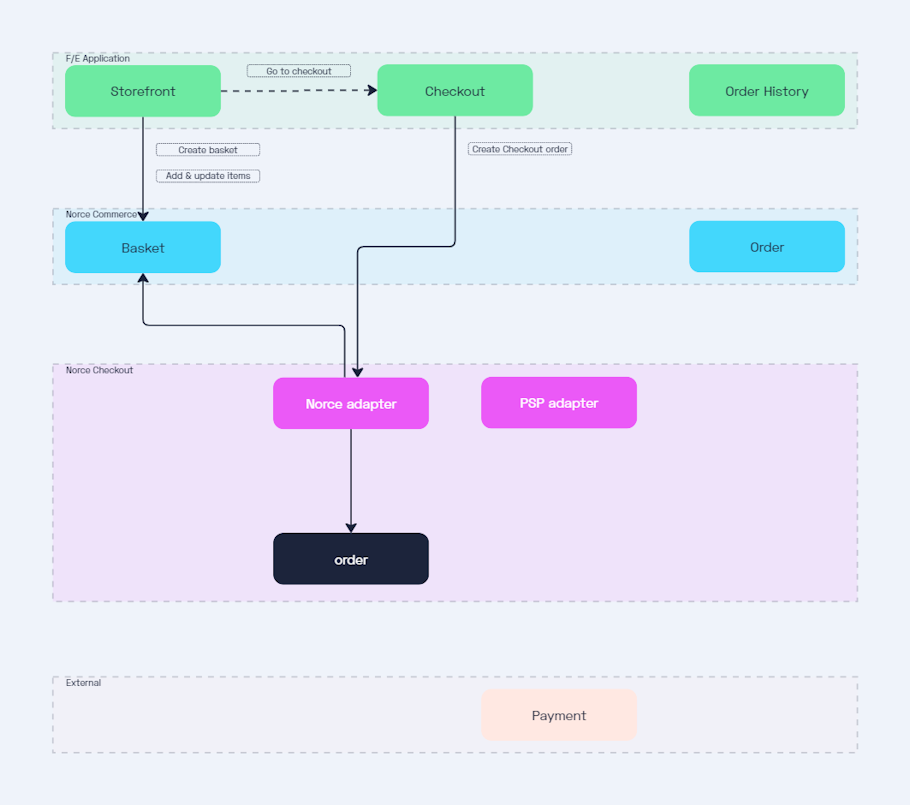
When a customer is ready to check out, the Norce Adapter takes the basket from Norce Commerce and creates a corresponding order in Norce Checkout. The adapter handles the translation between the Norce Commerce data model and the Norce Checkout order structure, ensuring that cart items, customer information, and other relevant data flow seamlessly into the checkout process.
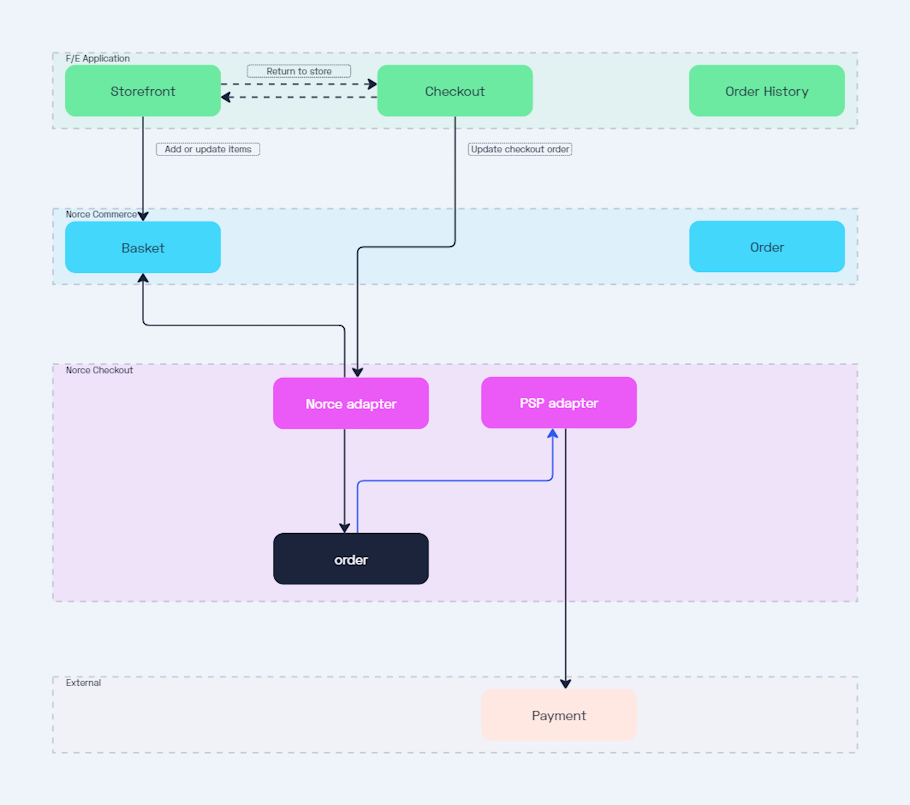
The Norce Adapter maintains synchronization between Norce Commerce and Norce Checkout throughout the checkout flow. When the customer updates quantities, adds items, or changes shipping options, the Norce Adapter ensures both systems stay in sync using Norce Checkout's hooks and notifications mechanism.
Key Responsibilities
The Norce Adapter handles several critical functions in the checkout flow:
Order Creation: The Norce Adapter creates a Norce Checkout order from the Norce Commerce basket. The adapter fetches basket data from Norce Commerce, maps it to the Norce Checkout order format, and registers the necessary hooks and notifications for ongoing synchronization.
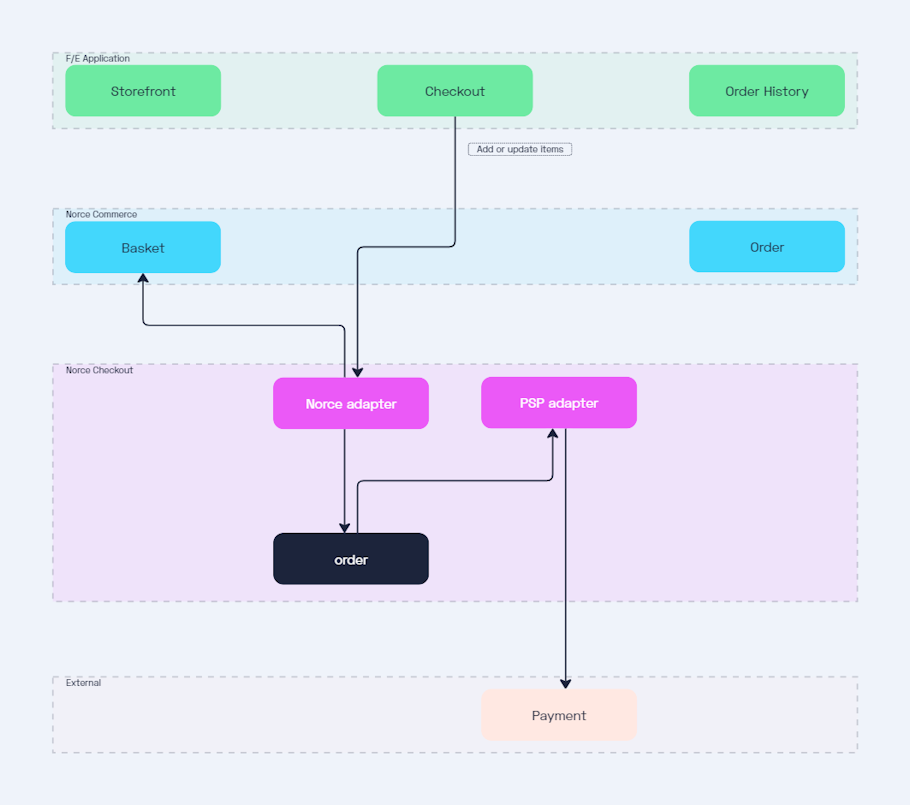
Cart Synchronization: When cart changes occur (quantity updates, item additions or removals), the Norce Adapter updates both the Norce Checkout order and the Norce Commerce basket to maintain consistency.
Customer Data Management: The Norce Adapter provides customer information to Norce Checkout. If a customer is logged in to your Norce Commerce storefront, the adapter passes their billing and shipping details to the checkout flow.
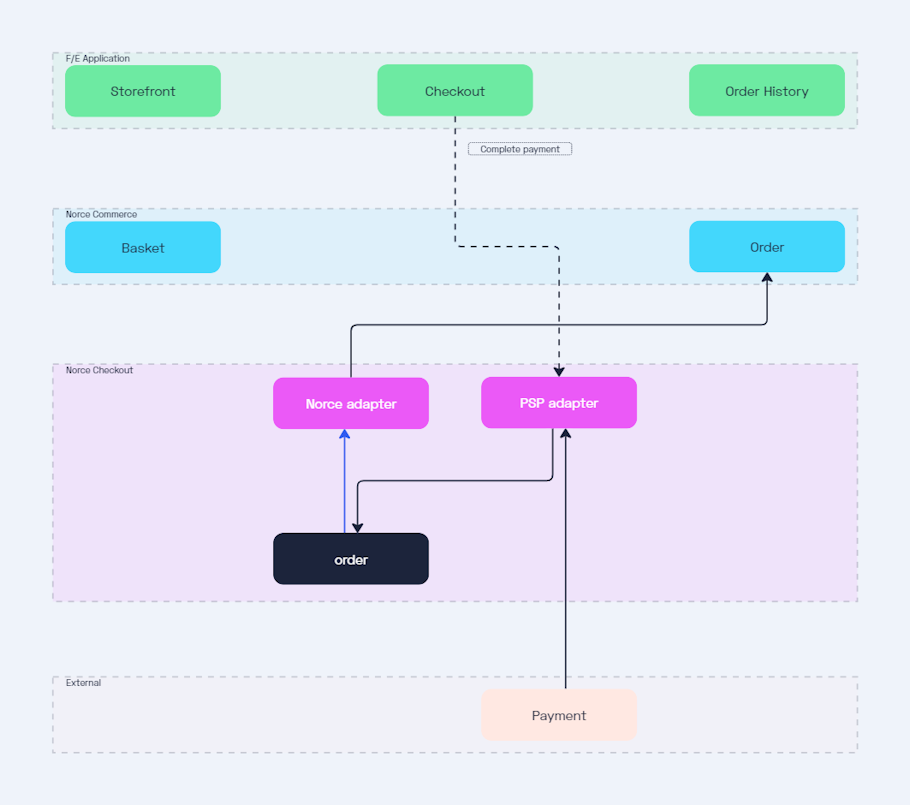
Order Export: When the checkout completes, the Norce Adapter exports the finalized order back to Norce Commerce. This creates a completed order in Norce Commerce with all payment and shipping details from Norce Checkout.
Configuration
The Norce Adapter requires specific configuration to authenticate with Norce Commerce (via Identity Server) and to map product and image URLs correctly. It serves as the secure link between your commerce data and the checkout experience.
For the full configuration schema, JSON examples, and field definitions, please refer to the Norce Adapter Developer Guide.
Delivery
The Norce adapter can manage shippings in two ways:
Full Control: The adapter provides Norce Checkout with the shipping option selected in Norce Commerce. In this case, the order will include shipping information based on the delivery method from Norce Commerce.
Leave to Norce Checkout: The adapter can also allow Norce Checkout to handle shippings. This is useful if you're adding shipping manually during checkout or using an external provider, like Klarna Checkout with Klarna Shipping Assistant.
This behavior is controlled via feature flags in the adapter configuration. See the Developer Guide for implementation details.
Creating an Order
When creating an order you provide context such as the basket reference, culture, currency, and country. The Norce adapter starts by fetching its configuration and then retrieving the Norce Commerce checkout. It creates an order, mapping the basket to the cart. If configured to have full control of delivery, the delivery is mapped to a shipping.
If the checkout contains customer information, it is mapped to the order as well. If a Payer is set, it maps to customer.billing; if ShipTo is set, it maps to customer.shipping. If either is missing, Buyer is used as a fallback.
Updating an Order
Once an order has been created, it's essential to keep the data in both Norce Commerce and Norce Checkout synchronized. The Norce adapter automatically handles updates to Norce Commerce when changes originate from Norce Checkout. However, if changes are made in Norce Commerce first, you must inform the Norce adapter to reflect those changes in Norce Checkout.
Handling Updates from Norce Checkout
When changes are made in Norce Checkout (e.g., a payment provider adapter adds customer information), the Norce adapter detects the update and automatically pushes it to Norce Commerce. This ensures that both systems stay aligned without manual intervention.
Handling Updates from Norce Commerce
If changes are made in Norce Commerce (e.g., adding items to the basket or adjusting item quantities), the Norce adapter is unaware of these updates. In such cases, you need to explicitly inform the Norce adapter by calling Update Order. This will trigger the Norce adapter to synchronize the changes with the order in Norce Checkout.
Example Scenarios
- Customer Information: If customer information is updated via a payment provider in Norce Checkout, the Norce adapter will ensure that the data is mirrored in Norce Commerce.
- Quantity Changes: If an item's quantity is adjusted in Norce Checkout, the Norce adapter will first update Norce Commerce to account for promotions or other rules, then reflect the updated quantity in Norce Checkout.
- Basket Updates: If an item is added to the basket in Norce Commerce, you must notify the Norce adapter to update the order in Norce Checkout and ensure both systems remain in sync.
Payments
When using the Norce adapter we need to use the Norce Checkout Payment Method in Norce Commerce. This allows the adapter to provide Norce Commerce with payment information regardless of what the provider is.
Note: For NCO, the Admin payment method is always Norce Checkout (ID 239). Provider-specific settings are managed via the NCO Configuration API, not the legacy Shopping settings.
When the Norce Checkout order state is changed to processing the Norce adapter will validate the order, confirming that Norce Checkout and Norce Commerce data is synchronized. It will then validate the payment, in effect storing a copy of the basket. When the state is then changed to completed the payment will be completed. Any changes made to the basket while the payment was being processed are ignored. When the payment is completed the order is available in Norce Commerce.
Payment Flow Example
Consider a customer that enters the checkout, begins the payment process but then realizes that they want to change the quantity of an item before completing the payment process. When the payment process was begun, the order state was changed to processing. When the adapter then tries to update the cart with the modified quantity the order service will first change the state to checkout again. The payment provider adapter will be informed of the state change, able to confirm that the payment has not been completed. The cart change is committed and the payment process can be started again.
Bundles
In Norce Commerce bundles, aka structure articles, are all displayed in the same list with types and references to parent item to make it clear what is a bundle and what are the items in the bundle.
In the Norce Checkout order, cart items instead have a list of items. For a regular item, this list will always be empty. For a bundle you will only see the bundle in the cart item list, and instead see the containing items on the bundle.
Norce Commerce vs Norce Checkout
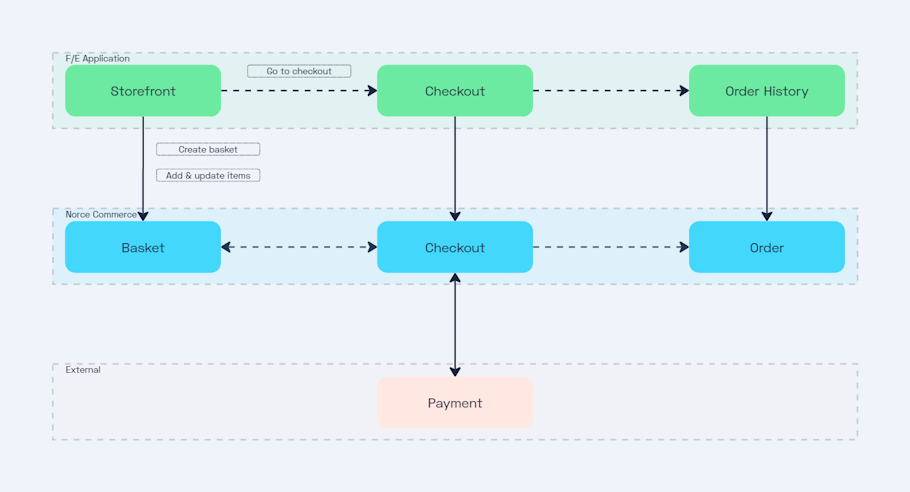
The old checkout experience in Norce Commerce
Using Norce Commerce with Norce Checkout
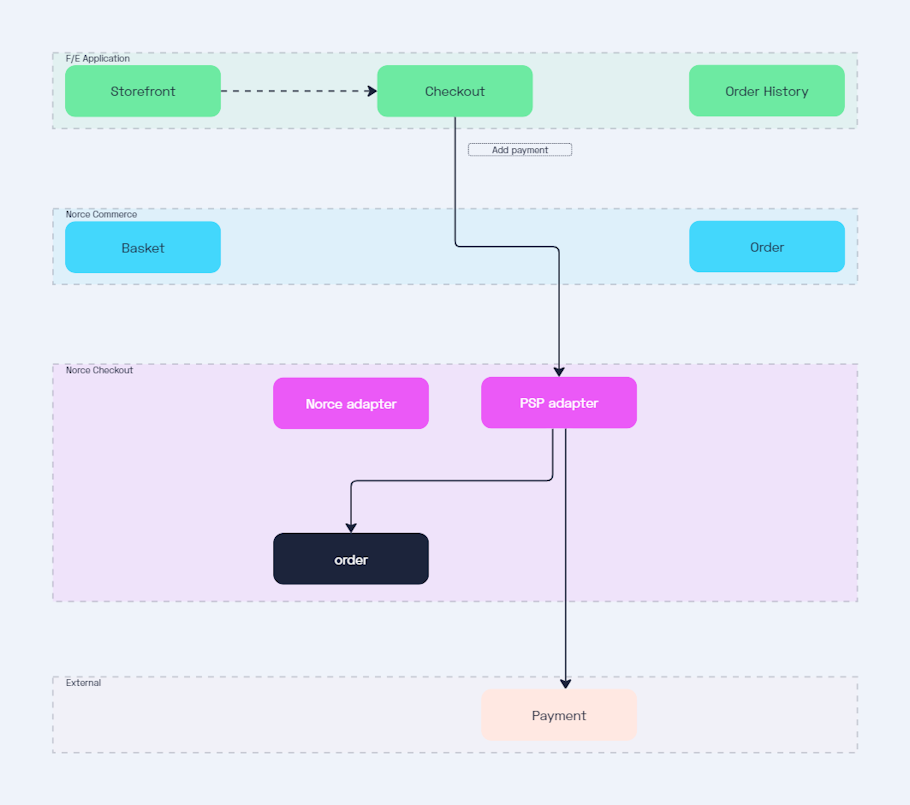
Initialize a payment
Complete a payment
Return to store and back to checkout again
Modify basket in Norce Checkout
Integration with Provider Adapters
Once the Norce Adapter creates an order in Norce Checkout, you can add any combination of provider adapters to handle payment, shipping, and vouchers. The Norce Adapter works alongside provider adapters through Norce Checkout's hooks and notifications system, ensuring all adapters stay synchronized as the order progresses through checkout.
For example, when using the Norce Adapter with the Klarna Checkout adapter:
- The Norce Adapter creates a Norce Checkout order from a Norce Commerce basket
- The Klarna adapter creates a payment session and adds shipping options
- When the customer completes payment in Klarna, the Klarna adapter updates the order state
- The Norce Adapter receives a notification and exports the completed order to Norce Commerce
This separation of concerns allows you to mix and match provider adapters while keeping your Norce Commerce integration consistent.
Further Reading
- Custom Adapter - Guide to building your own platform adapter
- Adapters Overview - General concepts about adapters in Norce Checkout