Norce Product MCP — Tool Reference
This page documents the tools exposed by the Norce Product MCP Server. For setup and connection instructions, see Using the Norce Backend MCP Servers.
force_confirmparameter: Write tools include aforce_confirmparameter, backed by a server-side guard that classifies each operation by impact. Lower-impact operations go through, with a warning attached on stage and production. Higher-impact operations are blocked on stage and production untilforce_confirmis set. A few destructive operations are blocked on every environment, including test. Each tool below states which of these applies.
Key concepts
Two views of product data
The Product MCP exposes products through two different lenses, and choosing the right one matters:
Raw view —
norce_product_query_productskus,norce_product_query_variantized_products, andnorce_product_lookup_productsquery the Query API directly. Results reflect the stored state of the data with no business logic or caching applied. Use these for diagnostic reads, import verification, and identifier lookups.Storefront view —
norce_product_preview_productandnorce_product_search_productscall the ProductApi. Results include resolved prices, on-hand status, applied availability rules, and customer-specific pricing. Use these to see what a customer or storefront would see.
The storefront view is application-specific — the applicationId you pass determines which storefront's perspective you are seeing. Different applications (for example a Swedish storefront and a Norwegian storefront) can have different price lists, sales areas, and availability rules, so the same product may render differently depending on which application ID is used. Use norce_config_list_applications to discover all application IDs for the client, then switch between them to compare how different storefronts present the same product.
Import split: master data vs content
Creating and updating products uses two separate tools for two distinct types of data:
norce_product_upsert_productshandles ERP-style master data — creating SKUs with an initial status, and setting part numbers, type, EAN codes, logistic dimensions, and VAT. Use this when the data comes from a product master or ERP system.norce_product_update_contenthandles PIM-style content — updating images, text (name, description, SEO fields), parametric values, flags, and category assignments on products that already exist. Use this when the data comes from a content management or enrichment workflow.
Both tools go via the Connect API and return a job ID for async status polling.
Multi-variant grouping — the most common import failure
When creating or updating a product that has multiple variants (for example a shirt in red/blue or S/M/L), all SKUs in the same variant cluster must share the same code value in the import payload. The Product MCP auto-groups records with the same code into a single Connect entry.
Submitting variants as separate records without a shared code causes Connect to silently report success with zero inserts — or fail with a "Multiple items with same variant code" error. This is the most common cause of import failures.
Metadata tools
These tools read and manage the reference data that products are built from — categories, parametrics, flags, manufacturers, file types, relation types, and variant groups.
List Product Categories
norce_product_list_categories
Lists all product categories as a flat list with IDs, codes, names, parent references, and active status. Translations and VAT code assignments are omitted — use norce_product_get_category for those.
Use this tool to browse the category tree, find category IDs or codes before assigning products, or get a quick overview of the category structure.
Parameters
applicationId— any valid application ID for the client.parent_id— filter to direct children of a specific category ID.include_inactive— set totrueto include inactive categories.
Output
A flat list of categories with their IDs, codes, names, parent references, sort order, and active status.
Get Category
norce_product_get_category
Returns full details for a single category — including translations (Cultures), VAT code assignments, and all parametrics currently assigned to the category.
Use this tool before assigning or modifying parametrics on a category, to see the current state before running a full-replace operation.
Accepts either ID (faster, direct lookup) or code (slightly slower, fetches full list and filters).
Parameters
applicationId— any valid application ID for the client.id— category ID (preferred — direct lookup).code— category code (slower — fetches list and filters).
Output
The full category record including VAT code assignments, cultures with translations, and the list of assigned parametrics.
List Parametric Groups
norce_product_list_parametric_groups
Lists all parametric groups — the logical containers that organise parametrics into sets.
Use this tool to discover group IDs before creating parametrics in a specific group, or to understand how the parametric schema is structured.
Parameters
applicationId— any valid application ID for the client.include_inactive— set totrueto include inactive groups.
Output
A list of parametric groups with their IDs, codes, names, sort order, and translations.
List Parametrics
norce_product_list_parametrics
Lists all parametric definitions with their type, group, searchability, filterability, and translations.
Use this tool to find parametric IDs or codes before assigning values to products, or to audit the full parametric schema for a client.
Parameters
applicationId— any valid application ID for the client.group_id— filter to parametrics in a specific group.include_inactive— set totrueto include inactive parametrics.
Output
A list of parametrics with their IDs, codes, names, types, group assignments, and translation entries.
Get Parametric
norce_product_get_parametric
Returns full details for a single parametric — including all configured list or multi-select values for parametrics of type list or multiple.
Use this tool before calling norce_product_update_parametric to see the current list values. Since updating values is a full-replace operation, you need the complete current state before adding or removing individual values.
Accepts either ID (faster) or code (slightly slower).
Parameters
applicationId— any valid application ID for the client.id— parametric ID (direct lookup).code— parametric code (slower — fetches list and filters).
Output
The parametric definition including all list values or multi-select values (if applicable), with translations per value.
List Product Flags
norce_product_list_flags
Lists all product flag groups with their nested flags. Returns the complete flag structure in a single call.
Use this tool to discover flag codes before setting or unsetting flags on products, or to audit which flags are defined and at which level.
Flag TypeId controls what the flag applies to: 1 = product-level, 2 = SKU/variant-level.
Parameters
applicationId— any valid application ID for the client.include_inactive— set totrueto include inactive flag groups and flags.
Output
A list of flag groups, each with their nested flags including codes, names, type (product vs SKU level), and translation entries.
List Manufacturers
norce_product_list_manufacturers
Lists all manufacturers with their codes and names. The manufacturer code is used when linking products to manufacturers in imports (ManufacturerCode field).
Use this tool to find manufacturer codes or IDs before creating products or looking up products by manufacturer.
Parameters
applicationId— any valid application ID for the client.include_inactive— set totrueto include inactive manufacturers.
Output
A list of manufacturers with their IDs, codes, names, and whether each is active.
List File Types
norce_product_list_file_types
Lists all product file types — the type definitions that control what kinds of files (images, PDFs, videos, etc.) can be attached to products.
Use this tool to discover file type codes before attaching images or files in a content import.
Parameters
applicationId— any valid application ID for the client.include_inactive— set totrueto include inactive file types.
Output
A list of file types with their IDs, codes, names, and translations.
List Relation Types
norce_product_list_relation_types
Lists all product relation type definitions — the types that define how products can be related to each other (accessories, alternatives, bundle contents, etc.).
Use this tool before importing product relations to find the correct relation type codes.
IsBidirectional means a relation A → B automatically creates the reverse relation B → A.
Parameters
applicationId— any valid application ID for the client.include_inactive— set totrueto include inactive relation types.
Output
A list of relation types with their IDs, codes, names, bidirectionality flag, and translations.
List Variant Groups
norce_product_list_variant_groups
Lists all product variant group definitions with their variant type axes — the parametrics that define which dimensions (such as Size, Color) make up the variant structure.
Use this tool to find variant group codes before assigning products to a variant group in a content import.
Parameters
applicationId— any valid application ID for the client.include_inactive— set totrueto include inactive variant groups.
Output
A list of variant groups, each with their variant type axes (parametric ID, type, sort order), and translations.
List Missing Translations
norce_product_list_missing_translations
Sweeps all active product metadata entities and returns those missing a name translation, for one culture or for each active culture of the application. Checks categories, parametric groups, parametrics, flag groups, flags, file types, relation types, and variant groups in a single call. Manufacturers are not checked. Product texts are checked by norce_product_check_product_translations.
An entity is untranslated in a culture when its name there is blank or inherited from the client's default culture, so the storefront in that culture shows the default-language name.
Use this tool when preparing for a new market launch, doing a translation completeness audit before go-live, or as a routine maintenance check after metadata changes — for example after adding new categories, parametrics, or flags — to catch any newly introduced entities that are missing translations.
Parameters
applicationId— any valid application ID for the client.culture_code— the culture to check, for example"de-DE". Omit it to check each active culture of the application, primary first.
Output
The cultures checked, the number of entities checked and missing, the number checked per entity type, and each untranslated entity with its type, ID, code, name and the cultures it lacks.
Check Product Translations
norce_product_check_product_translations
Checks which texts lack a translation on the products a filter matches and on their variant clusters, for one culture or for each active culture of the application. Its filters, listed below, match as in norce_product_lookup_products, except that a category includes its subcategories. At least one filter is required.
A text is missing in a culture when the product has it in some culture and none of its own in this one: blank, absent, or only the default culture's, so the storefront in that culture shows another language. A text that no culture has is not reported. Products are checked on each culture text that norce_product_update_content writes, except the URL name, which the platform generates from the name; the image alt text is the main image's. Variant clusters are checked on name, title, meta tags, meta description and image alt text.
Use this tool when planning a translation project for part of the catalog, before a market launch, or after a product import. Metadata names such as categories, parametrics and flags are checked by norce_product_list_missing_translations.
Parameters
applicationId— any valid application ID for the client.culture_code— the culture to check, for example"nb-NO". Omit it to check each active culture of the application, primary first.category_ids— products in any of these categories or their subcategories, so pass only the top category.manufacturer_id— a manufacturer ID.part_nos— up to 200 part numbers.type_id— a SKU type ID.parametric_filter— a condition on the product's parametrics, written as fornorce_product_lookup_products.
One call checks at most 5,000 matching part numbers, in part number order, and stops sooner if reading takes more than 20 seconds. The result says when more match. Narrow the filter, for example to one subcategory, and check the rest in further calls.
Output
The cultures checked, how many products and variant clusters were checked and how many lack a text, and each product or cluster missing a translation with its part number or cluster code, name, SKU status, primary category, the cultures it lacks and the texts each culture lacks, named as the culture fields of norce_product_update_content. Products are checked whatever their status. Texts are read with no cache, so a text imported a couple of minutes ago may not show yet.
Create or Update Category
norce_product_upsert_category
Creates a new product category or updates an existing one. Provide id to update; omit it to create.
Important: Setting is_active = false hides all products assigned to this category from the storefront. This requires force_confirm on stage and production and should be done deliberately.
Parameters
applicationId— any valid application ID for the client.id— category ID for update. Omit to create.code— unique category code.name— display name (required for create).parent_id— parent category ID. Set tonullto place at the root.is_active— set tofalseto soft-delete.sort_order— display sort order.cultures— translations, each withculture_codeandname.force_confirm— required on stage and production when deactivating (is_active = false). Create and update proceed with a warning there.
Output
The created or updated category with its ID, code, name, parent, active status, sort order, and translations.
Assign Parametrics to Category
norce_product_assign_category_parametrics
Sets the full list of parametrics assigned to a category.
Important: This is a full-replace operation — the list you provide becomes the complete set of parametrics for the category. Always call norce_product_get_category first to retrieve the current assignments, then include all existing parametric IDs plus any new additions in your request.
Parameters
applicationId— any valid application ID for the client.category_id— category ID.parametric_ids— the complete list of parametric IDs to assign.force_confirm— required on stage and production.
Output
Confirmation of the assigned parametric IDs.
Create or Update Parametric Group
norce_product_upsert_parametric_group
Creates a new parametric group or updates an existing one. Provide id to update; omit it to create.
Parameters
applicationId— any valid application ID for the client.id— group ID for update. Omit to create.code— unique code.name— display name.is_active— set tofalseto soft-delete.sort_order— display sort order.cultures— translations, each withculture_codeandname.force_confirm— required on stage and production when deactivating. Create and update proceed with a warning there.
Output
The created or updated parametric group.
Create Parametric
norce_product_create_parametric
Creates a new parametric definition. The type is required and validated before creation. Code uniqueness is checked — creation fails if a parametric with the same code already exists. New parametrics are always created as active.
To update an existing parametric, use norce_product_update_parametric instead.
Parametric types: text, html, int, decimal, date, boolean, list, multiple.
Important: is_public = true automatically assigns the parametric to all categories. Use this only for truly global attributes that should appear everywhere.
Parameters
applicationId— any valid application ID for the client.type— parametric type (required).code— unique code. Must not already exist.name— display name.description— longer description.uom— unit of measurement, for example"kg"or"mm".group_id— group ID. The group must exist and be active.sort_order— display sort order.is_required— mark as required on products.is_favorite— pin as favourite in admin UI.is_public— auto-assign to all categories.is_read_only— disable editing in admin UI.is_hidden— hide from front-end.default_is_variant_unique— default to variant level when merging products.cultures— translations.force_confirm— not required. Creation proceeds with a warning on stage and production.
Output
The created parametric definition with its full set of properties.
Update Parametric
norce_product_update_parametric
Updates an existing parametric definition and optionally replaces its enumerated list or multi-select values.
Important: If list_values or multiple_values are provided, they fully replace all existing values for the parametric. Always call norce_product_get_parametric first to retrieve current values before replacing.
Parameters
applicationId— any valid application ID for the client.id— parametric ID (required).code,name,description,uom,group_id,sort_order,is_active,is_required,is_favorite,is_public,is_read_only,is_hidden,default_is_variant_unique— any combination.cultures— translations.list_values— complete replacement list fortype=listparametrics. Each entry requirescodeandvalue. Includeidfor existing values; omit it for new ones.multiple_values— complete replacement list fortype=multipleparametrics. Same structure aslist_values.force_confirm— required on stage and production when replacing list/multiple values. Other updates proceed with a warning there.
Output
The updated parametric and confirmation of any list or multiple value updates.
Create or Update Flag Group
norce_product_upsert_flag_group
Creates a new product flag group or updates an existing one. Provide id to update; omit it to create.
is_multiple_choice controls whether multiple flags from this group can be set on a product simultaneously.
Parameters
applicationId— any valid application ID for the client.id— group ID for update. Omit to create.code,name,is_active,is_multiple_choice,is_favorite,sort_order— any combination.cultures— translations.force_confirm— required on stage and production when deactivating. Create and update proceed with a warning there.
Output
The created or updated flag group.
Create or Update Flag
norce_product_upsert_flag
Creates a new product flag or updates an existing one. Provide id to update; omit it to create.
type_id controls scope: 1 = applied at the product level, 2 = applied at the SKU/variant level.
Parameters
applicationId— any valid application ID for the client.id— flag ID for update. Omit to create.code,name,group_id,type_id,is_active,is_manually_editable,sort_order— any combination.cultures— translations.force_confirm— required on stage and production when deactivating. Create and update proceed with a warning there.
Output
The created or updated flag.
Create or Update Manufacturer
norce_product_upsert_manufacturer
Creates a new manufacturer or updates an existing one. Provide id to update; omit it to create.
The manufacturer code is used in product imports to link products to manufacturers.
A manufacturer's name is the same in every culture. Manufacturers have no translated names or descriptions, so the tool takes no translations.
Parameters
applicationId— any valid application ID for the client.id— manufacturer ID for update. Omit to create.code— unique manufacturer code. Used in product imports.name,is_active— any combination.force_confirm— required on stage and production when deactivating. Create and update proceed with a warning there.
Output
The created or updated manufacturer.
Create, Update, or Delete File Type
norce_product_upsert_file_type
Creates a new product file type, updates an existing one, or hard-deletes one.
File types are unusual in that they support a true hard-delete in addition to the normal soft-deactivate pattern used by all other metadata entities.
- To hard-delete: provide
idand setdelete = true. - To soft-deactivate: provide
idand setis_active = false. - To create: omit
id.
Parameters
applicationId— any valid application ID for the client.id— file type ID. Required for update or delete.delete— set totrueto hard-delete.code,name,is_active,sort_order— any combination.cultures— translations.force_confirm— required on stage and production when deactivating or deleting. Create and update proceed with a warning there.
Output
Confirmation message for delete, or the created/updated file type object.
Create or Update Relation Type
norce_product_upsert_relation_type
Creates a new product relation type or updates an existing one. Provide id to update; omit it to create.
is_bidirectional = true means a relation A → B automatically creates the reverse relation B → A.
Parameters
applicationId— any valid application ID for the client.id— relation type ID for update. Omit to create.code— unique code. Used in relation imports.name,is_active,is_bidirectional,sort_order— any combination.cultures— translations.force_confirm— required on stage and production when deactivating. Create and update proceed with a warning there.
Output
The created or updated relation type.
Create or Update Variant Group
norce_product_upsert_variant_group
Creates a new product variant group or updates an existing one. Provide id to update; omit it to create.
Each variant group has variant type axes — the parametrics that define the variant dimensions (for example Size and Color for a Clothing variant group).
Important: variant_types is a full-replace field — if you provide it, the entire list of variant type axes is replaced. Always call norce_product_list_variant_groups first to see the current state.
Parameters
applicationId— any valid application ID for the client.id— variant group ID for update. Omit to create.code,name,is_active,sort_order— any combination.variant_types— complete replacement list of variant type axes. Each entry requires aparametric_id.cultures— translations.force_confirm— required on stage and production when deactivating. Create and update — includingvariant_typesreplacement — proceed with a warning there.
Output
The created or updated variant group with its variant type axes and translations.
Product import tools
These tools create and update product data via the Connect API. All import operations are asynchronous — use norce_product_get_import_job_status to confirm completion.
Upsert Products
norce_product_upsert_products
Creates or updates SKUs via the Connect API — the ERP-style import path for product master data.
Use this tool when importing core product identity and logistics data: part numbers, manufacturer references, status, type, EAN codes, dimensions, VAT, and activation dates. For updating text content, images, parametrics, and flags on existing products, use norce_product_update_content instead.
Product identification:
manufacturer_code+manufacturer_part_noidentifies the product cluster and variant.part_noidentifies the SKU. It is optional on existing products too: a record without one updates the product with the samemanufacturer_codeandmanufacturer_part_no, and a record that matches no product creates one with a generated part number. Without apart_no,manufacturer_part_nomatches in any letter case, and the tool sends it in the case Norce already stores, so that case stays as it is. To change only the case, send the record with itspart_no.codegroups multiple variants under one product cluster — required when creating a product with multiple variants.
Multi-variant grouping: All variants in the same cluster must share the same code value. The tool auto-groups entries with the same code into a single Connect payload. Every entry with a given code must name the same manufacturer_code; the tool refuses the whole call otherwise, since a cluster has one manufacturer. This is critical — see Multi-variant grouping above.
Manufacturers: manufacturer_code must already exist, active or inactive, in any letter case. One unknown code makes the tool refuse the whole call before anything is imported, valid records included. Create the manufacturer first with norce_product_upsert_manufacturer. Products sent with an inactive manufacturer's code are imported under it, and a note in the result names that manufacturer and its id, so it can be reactivated with norce_product_upsert_manufacturer.
Categories: primary_category_code is only applied to a product that has no category yet. Use norce_product_update_content to change the categories of an existing product.
Note: name is set via NameCreateOnly — it will not overwrite an existing product name. Use norce_product_update_content to update names on existing products.
Parameters
applicationId— any valid application ID for the client.products— list of product records to upsert. Each record requiresmanufacturer_code,manufacturer_part_no,name,status, andtype. Optional fields includecode,part_no,primary_category_code,ean_code, logistic dimensions, dates, VAT, and unit of measurement.Updating an existing SKU takes the same required fields, so resend its stored values rather than guessing them.
typeandmanufacturer_part_noare written on every record: a wrongtypechanges the SKU's type, and a differentmanufacturer_part_norenames the product's.statussets the status of a new SKU only and is ignored on an existing one.force_confirm— required on stage and production.
Status codes: 1 = Active, 2 = Coming, 3 = Expiring, 4 = Hidden, 5 = Inactive. They apply to new SKUs only.
Output
Returns the import job's outcome in the same call: job status with inserted, updated, and failed counts, confirmed part numbers, and whether any records were auto-grouped. If the job is still running after 20 seconds, the result instead has status Submitted and the job ID, to follow with norce_product_get_import_job_status.
Update Product Content
norce_product_update_content
Updates PIM content on existing products via the Connect API. Products must already exist — this tool does not create new SKUs.
Use this tool for content enrichment: product text (name, description, SEO fields), images, parametric values, flags, additional category assignments, and variant group assignments.
Multi-variant grouping: When updating content for multiple variants of the same product, provide the same code on each entry. The tool auto-groups them into a single Connect payload. Without grouping, Connect rejects the job.
Text content levels: Text fields such as description, title, and meta tags live at either the product level or the variant level — this is configured per client. Use cultures for product-level text and variant_cultures for variant-level text. name and unique_url_name can be set at both levels.
Category assignment mode: categories_mode controls how categories are applied — "replace" (default) fully replaces the existing category list, "append" merges with it.
Flag write modes: Each flag entry supports is_create_only (only set if the flag record is new) and is_limited_update (only set if new or last updated by the same account). Use is_create_only to set flags only on first import.
Parameters
applicationId— any valid application ID for the client.products— list of product content records, each identified bypart_no. Optional fields per record:code(for grouping),main_image,additional_images,categories,categories_mode,cultures,flags,parametrics,variant_definition_group_code,variant_sort_order,variant_cultures,variant_main_image,variant_additional_images,variant_flags,variant_parametrics.force_confirm— required on stage and production.
Output
Returns the import job's outcome in the same call: job status with inserted, updated, and failed counts. If the job is still running after 20 seconds, the result instead has status Submitted and the job ID, to follow with norce_product_get_import_job_status.
Import Product Relations
norce_product_import_relations
Imports product-to-product relations via the Connect API.
Use this tool to create accessory, alternative, bundle, or custom relation links between products. relation_type_code must match an existing relation type — use norce_product_list_relation_types to find codes.
Parameters
applicationId— any valid application ID for the client.relations— list of relation records. Each requirespart_no(source),related_part_no(target), andrelation_type_code.force_confirm— required on stage and production.
Output
Returns the import job's outcome in the same call: job status with inserted, updated, and failed counts. If the job is still running after 20 seconds, the result instead has status Submitted and the job ID, to follow with norce_product_get_import_job_status.
Import Structure Items
norce_product_import_structure_items
Sets the child items for structure (bundle/package) products via the Connect API. The parent SKU must already exist and must be of a structure type.
Before importing, all child PartNos are validated against the Query API — they must exist and have an acceptable status (Active, Coming, Expiring, or Hidden). Inactive children are rejected.
Use this tool to define or update the component list for bundle products.
Parameters
applicationId— any valid application ID for the client.items— list of structure definitions, each with aparent_part_noand achildrenlist. Each child requirespart_noandquantity.force_confirm— required on stage and production.
Output
Returns the import job's outcome in the same call: job status with inserted, updated, and failed counts, plus child validation results. If the job is still running after 20 seconds, the result instead has status Submitted and the job ID, to follow with norce_product_get_import_job_status.
Get Import Job Status
norce_product_get_import_job_status
Checks the status of a Connect API import job.
Use this tool for an import that came back with status Submitted, or for details on a finished job. Pass wait_seconds (up to 20) to have the call wait for the job to finish instead of polling.
Status values: 2 = Succeeded, 3 = Failed, 4 = Validation failed. Any other code means the job has not finished, and the tool reports it as "In progress". An import that returns Submitted and a job that reads "In progress" here are the same unfinished job. A job reported as succeeded while some records failed or never landed is reported as "Partial failure".
Parameters
applicationId— any valid application ID for the client.job_id— job ID returned by any of the import tools.wait_seconds— optional, 0–20. Holds the call until the job finishes or the time runs out. Default 0 checks once.
Output
Job status, finish flag, and record counts (inserted, updated, failed, total).
Product query tools
Lookup Products
norce_product_lookup_products
Lightweight product identifier lookup. Returns PartNo, ProductId, VariantCode, and VariantId — the identifiers needed to pass into other tools — without fetching full product content.
Use this tool when you need to find products by name, category, manufacturer, manufacturer part number, type, or parametric value before running an import, content update, or diagnostic check. Also useful for data quality sweeps — finding products that are missing a value, incorrectly configured, or meet a condition that cannot be filtered for in the Admin UI.
At least one filter must be provided. Multiple filters are AND-combined. See the ProductSKUs Query API reference for the full data model (version 2.0).
Parameters
applicationId— any valid application ID for the client.name_contains— products whose name contains the text, in the default name or any culture's name. Case-insensitive, and not a word search: "bus" also matches "Bussen".category_ids— products in any of these category IDs.manufacturer_id— filter by manufacturer.manufacturer_part_no— exact manufacturer part number lookup.type_id— filter by product type.variant_code— filter by variant code.part_nos— direct PartNo lookup.structure_parent_of— find structure products that contain a specific PartNo as a child.parametric_filter— ODataany()expression filtering on product parametric values. See Parametric filter below.filter— OData$filterexpression on the product record itself. See Filter below.top/skip— pagination. Default 100 results, max 500.top: 0returns no products and only how many match.
Output
For each matching product, its identifiers, name, status and type. A product's categories, structure items or relations are included when the call filters on them, for example its categories when filtering by category. The result also says how many products match when the page is shorter than top, and always with top: 0.
Parametric filter
The parametric_filter parameter uses OData any() syntax to filter on a product's parametric values. Each condition is scoped to a single parametric (p/ParametricId eq <id>) combined with a value check. Multiple conditions are AND-combined.
LLMs should already be trained on OData syntax — you do not need to know the syntax yourself. Describe what you are looking for in plain language and the AI will construct the correct expression. To help the AI resolve parametric IDs and value types, point it at the parametrics schema via the Norce Assistant MCP, or use norce_product_list_parametrics and norce_product_get_parametric to look them up first.
See the parametrics field in the ProductSKUs response schema for all available fields.
Examples
Find all products where parametric 42 has list value 7:
p/ParametricId eq 42 and p/ListId eq 7Find products where a decimal parametric (e.g. weight capacity) is between 50 and 200:
p/ParametricId eq 18 and p/DecimalValue ge 50 and p/DecimalValue le 200Find products where a boolean parametric (e.g. published on amazon) is true:
p/ParametricId eq 31 and p/BooleanValue eq trueFind products where a text parametric contains a specific substring (wildcard):
p/ParametricId eq 55 and contains(p/DefaultVarcharValue, 'keyword')Find products that do not have a specific list value assigned (negation — not possible in Admin UI):
p/ParametricId eq 42 and p/ListId ne 7What else is possible with parametric filter: filtering on multiple parametrics at once; checking whether a parametric value falls within a date range; combining range and null checks; finding products with any value set for a parametric vs. products with none; matching against specific text patterns.
Filter
The filter parameter is a standard OData $filter expression applied to the product record itself — not to parametric values. Use it to filter on product-level fields such as status, flags, stock, prices, supplier connections, and relations.
Available top-level collections for filtering and expanding
| Collection | What it contains | Further expandable paths |
|---|---|---|
Product | Product-level data — content, manufacturer, type, status | Product/Cultures, Product/SupplierSkus, Product/Parametrics, Product/ParametricMultiple, Product/Variant, Product/Flags, Product/ProductRelations |
PriceLists | Price list records for the SKU — active, inactive, and future — including cost, overridden rules, and chosen supplier | — |
SalesAreas | Sales areas and the VAT rate for the SKU (falls back to primary category or client default if not set) | — |
OnHands | Stock records per warehouse/location — on-hand quantity and value, incoming stock, next delivery date, lead time, reservation value, and whether the warehouse is active for the SKU | — |
StructureItems | Bundle/package child links with quantity — for structure products only | StructureItems/PriceLists, StructureItems/ItemSku |
BestPrices | Historical record of price changes for the application's best price | — |
Examples
Find products assigned a specific flag (flag ID 12):
Product/Flags/any(f: f/FlagId eq 12 and f/IsActive eq true)Find products not assigned specific flags (flag IDs 38, 39, or 40):
not Product/Flags/any(f: f/FlagId in (38, 39, 40) and f/IsActive eq true)Find products stocked at a specific warehouse and location (warehouse ID 4, location ID 4):
OnHands/any(o: o/WarehouseId eq 4 and o/LocationId eq 4 and o/IsActive eq true)Find products with stock that has not been updated in the last 30 days (warehouse ID 4, location ID 4):
OnHands/any(o: o/WarehouseId eq 4 and o/LocationId eq 4 and o/OnHandLastUpdated lt 2026-05-27T00:00:00Z)Find products with a supplier connection:
Product/SupplierSkus/any()Find products with no supplier connection (useful for spotting unmapped products):
not Product/SupplierSkus/any()Find products connected to a specific supplier (supplier ID 5):
Product/SupplierSkus/any(s: s/SupplierId eq 5)Find products marked as dangerous goods:
Product/IsDangerousGoods eq trueFind products where a specific parametric has no value set at all (data quality sweep — parametric 42 not assigned on any variant):
Product/Parametrics/all(p: p/ParametricId ne 42)Find products active on the standard price list (price list ID 4):
PriceLists/any(p: p/PriceListId eq 4 and p/IsActive eq true)Find products recently deactivated on a specific price list:
PriceLists/any(p: p/PriceListId eq 4 and p/IsActive eq false and p/StoppedDate gt 2026-01-27T00:00:00Z)Find products missing unit cost on the standard price list:
PriceLists/any(p: p/PriceListId eq 4 and p/IsActive eq true and p/CostUnit eq 0)Find products with a chosen supplier from a specific supplier (supplier ID 1) on the standard price list:
PriceLists/any(p: p/PriceListId eq 4 and p/IsActive eq true and p/ChosenSupplierId eq 1)What else is possible with filter: filtering by UNSPSC code; combining flag and stock conditions; finding products below the stock display breakpoint; filtering by product type, active status, or creation date; filtering by product relations; combining any of the above conditions.
Query Product SKUs
norce_product_query_productskus
Reads raw product data from the Query API by PartNo or ProductId — the diagnostic view with no business logic or caching applied.
Use this tool to verify imported data, check product status directly from the database, or retrieve the raw state of a product before updating it.
Parameters
applicationId— any valid application ID for the client.part_nos— lookup by PartNos.product_ids— lookup by ProductIds.include_structure_items— include bundle/package child items.include_product_relations— include related products.include_content— include flags (on Product) and parametrics (on SKU).top/skip— pagination. Default 50, max 200.
Output
Raw Query API product records with SKU fields, product cluster info, cultures, and optionally structure items, relations, flags, and parametrics.
Query Variantized Products
norce_product_query_variantized_products
Reads variant cluster data from the Query API — returning the cluster and all its individual variant items together.
Note: the Query API naming is inverted compared to the Product MCP's conventions — in the raw API, "Variant" holds the cluster and "Product" holds the individual item. This tool renames them in the output to be intuitive: the cluster is the root object, and each variant item is in VariantizedProducts[].
Use this tool when you need to work with the full structure of a variant cluster — for example to audit which SKUs belong to a variant, or to check variant-level content.
Parameters
applicationId— any valid application ID for the client.variant_ids— lookup by Variant (cluster) IDs.variant_codes— lookup by Variant codes.include_variant_group— include the variant group definition.include_product_relations— include related products on each variant item.include_content— include flags, parametrics, and files on each variant item.top/skip— pagination. Default 50, max 200.
Output
Variant cluster records with their individual variant items (products and SKUs), optionally with content and relations.
Preview Product
norce_product_preview_product
Returns the storefront view of a product — what a customer or the storefront would see, including resolved prices, on-hand status, and applied business rules, via the ProductApi.
Use this tool to verify what a product looks like in a specific context (sales area, price list, currency, customer), or to troubleshoot a product display issue from the customer perspective. Because the result is application-specific, you can also pass a different applicationId to compare how the same product renders on two different storefronts — for example the Swedish application versus the Norwegian one.
For raw diagnostic data, use norce_product_query_productskus instead.
Parameters
applicationId— any valid application ID for the client.part_no— product PartNo to preview.status_seed— comma-separated status IDs (1 = Active, 2 = Coming, 3 = Expiring, 4 = Hidden, 5 = Inactive, 6 = NotActivated)."1"= active only (default),"1,5"= active + inactive.culture_code— language/locale, for example"en-GB".sales_area_id— sales area context.pricelist_seed— comma-separated price list IDs.store_seed— comma-separated store IDs.currency_id— currency for price display.customer_id— customer ID for customer-specific pricing.company_id— company ID for B2B pricing.
Output
The full ProductApi product object with prices, on-hand status, variants, files, categories, and applied business rules.
Search Products
norce_product_search_products
Searches and lists products via the ProductApi — the storefront representation with prices, on-hand, and applied business rules.
Use this tool for text search, category-based listing, flag filtering, or manufacturer filtering — returning the customer-facing product view. Supports pagination. You can also pass a different applicationId to compare how the same search or category listing renders on two different storefronts.
For raw/diagnostic reads without business logic, use norce_product_query_productskus instead.
Parameters
applicationId— any valid application ID for the client.part_nos— batch lookup by PartNos (alternative to search).search_string— free-text product search.category_seed— comma-separated category IDs.manufacturer_seed— comma-separated manufacturer IDs.flag_seed— comma-separated flag IDs.status_seed— comma-separated status IDs. Default"1"(active only).sort— sort expression, for example"Name Asc"or"Price Desc".page_size/page— pagination. Default 20 results per page, max 100.culture_code,sales_area_id,pricelist_seed,store_seed,currency_id,customer_id,company_id— context for prices and availability.
Output
A paginated list of ProductApi product objects with a total count and hasMore flag.
Diagnostic tools
Check Product Issues
norce_product_check_product_issues
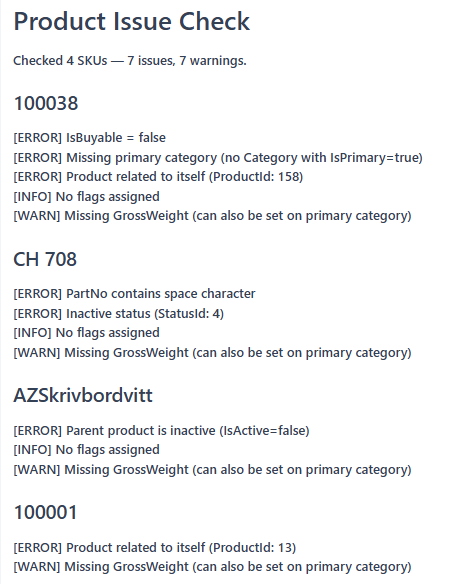
Fast diagnostic check for common product data problems. Checks up to 50 SKUs in a single call.
Use this tool when preparing products for publication, after an import to verify data quality, or when investigating why a product is displaying incorrectly.
Checks performed:
Issues (likely broken): inactive status, PartNo containing spaces, IsBuyable = false, product name with leading/trailing whitespace, missing primary category, multiple primary categories, product related to itself, product listed as its own structure item.
Warnings (worth reviewing): PartNo containing risky characters, missing ManufacturerPartNo, missing GrossWeight, IsRecommendedSalesQtyFixed = true, no flags assigned.
For bundle/package structure validation, use norce_product_check_bundle_integrity instead.
Parameters
applicationId— any valid application ID for the client.part_nos— list of PartNos to check. Maximum 50.
Output
A summary with total checked, issues found, and warnings found — plus per-SKU results with issues, warnings, and passed checks listed.
Check Bundle Integrity
norce_product_check_bundle_integrity
Deep integrity check for bundle and package (structure) products. Validates the parent and all child SKUs together.
Use this tool before publishing a bundle product or after updating bundle structure items, to confirm all child products exist, are active, and that no circular references have been created.
Note: this tool can be slow for large bundles — it performs multiple Query API calls. Use norce_product_check_product_issues for general product checks.
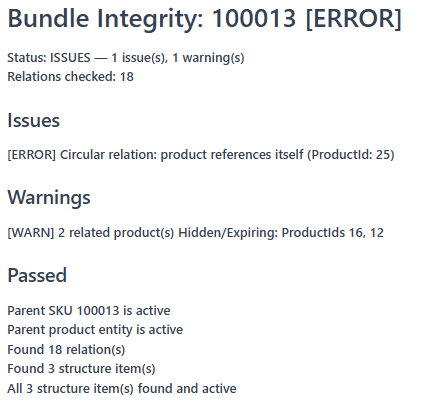
Checks performed: Parent product is active and valid; all child PartNos exist; no child products are inactive; no circular relations; minimum of 2 children (warns if fewer).
Parameters
applicationId— any valid application ID for the client.part_no— PartNo of the bundle or package product.relation_type_code— only check relations of this type (default: all relation types).
Output
Check status (ok, issues, or warnings), with the parent product, all child records, and detailed issues, warnings, and passed checks.
Typical workflows
Importing a product catalogue
A typical catalogue import uses the Product MCP for product data and content, with optional parallel imports from other MCP servers:
- Use
norce_product_upsert_productsto create SKUs — providing manufacturer references, part numbers, status, type, and category assignment. - Poll
norce_product_get_import_job_statusuntil the product import completes. - Use
norce_product_update_contentto enrich the created SKUs with content — descriptions, images, parametric values, and flags. - Poll
norce_product_get_import_job_statusuntil the content import completes. - Optionally, run imports in parallel using the other Backend MCP Servers: import retail prices via the Pricing MCP, update stock levels via the Inventory MCP, and register supplier cost prices and product mappings via the Supplier MCP.
- Spot-check with
norce_product_check_product_issueson a sample of the imported PartNos.
Enriching product content
- Use
norce_product_lookup_productsto find PartNos — filter by category, manufacturer, or flag. - Use
norce_product_query_productskuswithinclude_content = trueto see the current parametric values and flags. - Use
norce_product_update_contentwith the enriched content. - Poll
norce_product_get_import_job_statusuntil complete. - Use
norce_product_preview_productto verify the result in the storefront view.
Checking products before publication
- Use
norce_product_lookup_productswithcategory_idsto find all SKUs in a category. - Run
norce_product_check_product_issueson the PartNos (in batches of 50). - Fix any issues using
norce_product_upsert_products(for core fields such as EAN, dimensions, and VAT; it does not change the status of an existing SKU) ornorce_product_update_content(for names, categories, and flags). - Run
norce_product_check_product_issuesagain to confirm all issues are resolved.
Auditing translation coverage
- Use
norce_product_list_missing_translationswith the target culture code to find all untranslated metadata entities, andnorce_product_check_product_translationswith a filter, for examplecategory_idswith the top category, to find the products and variant clusters that lack texts. - For each metadata entity type (categories, parametrics, flags), call the relevant upsert tool to add the missing culture entry. For product and variant cluster texts, use
norce_product_update_content, and pollnorce_product_get_import_job_statusuntil the import completes. - Run both checks again with the same arguments to confirm coverage is complete.
Setting up a new variant group
- Use
norce_product_list_parametricsto find the parametric IDs that will define the variant axes (for example Size and Color). - Call
norce_product_upsert_variant_groupwith the parametric IDs invariant_types. - Note the variant group code — you will use this in
norce_product_update_contentwhen assigning products to the group.
Troubleshooting a bundle product
- Call
norce_product_check_bundle_integritywith the bundle's PartNo. - If any child PartNos are missing or inactive, use
norce_product_query_productskuson those PartNos to confirm their status. norce_product_upsert_productsdoes not change the status of an existing SKU, so activate inactive children in Norce Admin, or correct the structure withnorce_product_import_structure_items.- Run
norce_product_check_bundle_integrityagain to confirm.