Working with the Legacy Purchase and Payment Process in Norce Commerce
This guide covers the legacy checkout path using the Commerce Services Shopping Service. Norce Commerce also supports Norce Checkout, a modern adapter-based checkout solution. See Working with Norce Checkout for the Norce Checkout path.
Purchase and Payment Processes
Norce Commerce supports multiple payment service providers (PSPs), grouped into three main types:
One-Step Payments
The customer completes payment in a single step, typically on the same page (e.g., invoice or pay-later methods).
One-step process Overview:
The following diagram shows the one-step payment process visually. 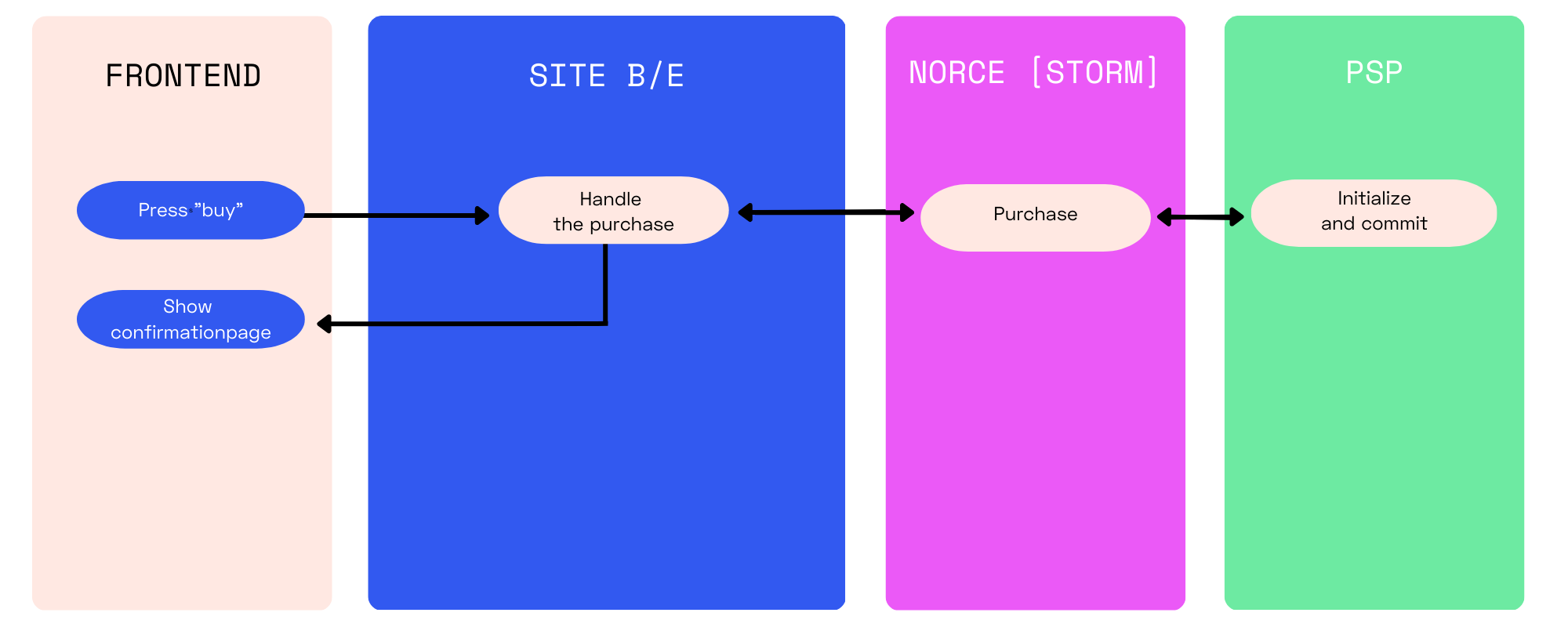
Process:
- User initiates purchase.
- Backend calls a purchase method in Norce Commerce.
- The response (
PaymentResponse) contains status and next steps.
Purchase Methods:
Purchase: Requires only basket ID.PurchaseEx: Allows overriding payment parameters.PurchaseEx2: Allows passing a full checkout object and payment parameters.
PaymentResponse Fields:
Status,StatusDescription: Status details.IsSynchronous: True for one-step payments.OrderNo,PaymentReference,RedirectUrl,RedirectParameters: Order and payment details.
Two-Step Payments
The customer is redirected to a payment window (e.g., card payments).
Two-step process Overview:
The following diagram shows the two-step payment process visually. 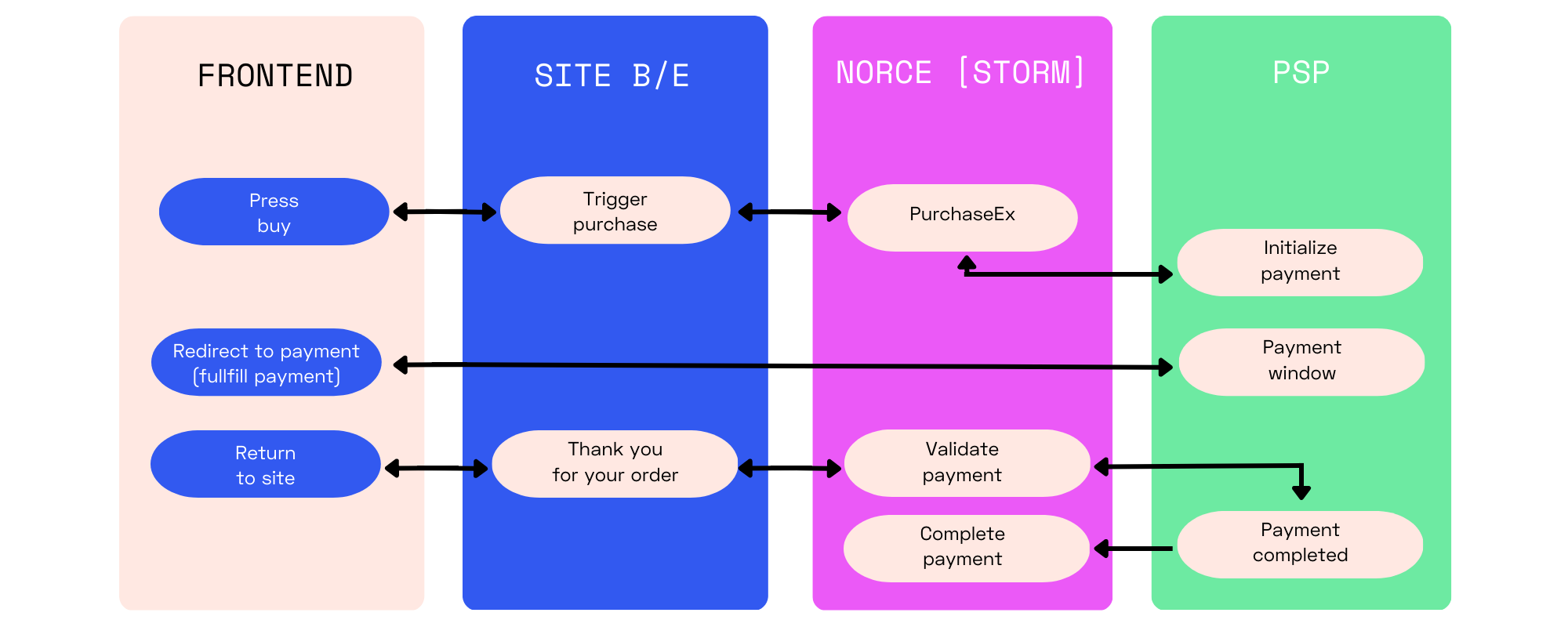
Process:
- Initiate purchase via Norce Commerce.
- Receive redirect URL and parameters.
- Redirect customer to PSP payment window.
- Customer completes payment and is redirected back.
- Validate payment using
PaymentCallbackorPaymentCallback2.
Callback Methods:
PaymentCallback: Validates payment and starts order process.PaymentCallback2: Validates payment only.
Note:
Always validate the payment after redirection before showing the confirmation page.
Form-Based Payments
Description:
The payment form is embedded (e.g., in an iframe) on the checkout page. The PSP collects customer information and triggers the purchase.
Process:
- Call
GetPaymentFormto get form embed information. - Render the form in the UI.
- Customer completes payment in the form.
- Validate payment using
PaymentFormCallback.
Callback Methods:
PaymentFormCallback: Validates form payment (does not start order process).- Use
PaymentCallbackif the order should be processed directly.
Order Confirmation
To display an order confirmation page:
- Call
GetOrderRequestto get order details. - Call
GetCheckoutto get the latest checkout object.
For two-step and form payments, pass the confirmation page URL to the PSP using the ShopCallbackUrl parameter.
Tip:
Add theBasketIdas a query parameter to theShopCallbackUrlfor reliable confirmation page display.
Confirmation Notifications
Norce Commerce can send order confirmation emails using Sendgrid. Configure this in the Admin UI.
Alternatively, trigger notifications using Norce Commerce Events and look up order information via Norce Commerce Query.
Availability Checks During Checkout
You can check product availability during checkout using:
ListProductOnHandByBasket: Returns OnHand info for all basket items.
Note:
Norce does not validate basket availability. Implement your own validation rules as needed.
Payment Capture (Settle)
Some payments require capture (settlement) after order delivery. You can use Norce Commerce’s capture functionality or handle it in your ERP system.
Read more about Payment Capture.
Additional Functionality
Important Payment Parameters
Different PSPs support different parameters. Norce maps common parameters to simplify integration.
| Parameter Name | Used In | Description |
|---|---|---|
CountryCode (*) | PurchaseEx, PurchaseEx2, GetPaymentForm | Country code for the purchase (ISO-3166-1 ALPHA-2, e.g., "SE", "FI"). Must be configured in Norce Commerce. |
CultureCode | PurchaseEx, PurchaseEx2, GetPaymentForm | Language for the PSP UI (ISO 639, e.g., "sv", "de", "sv-SE"). |
ShopCallbackUrl | PurchaseEx, PurchaseEx2, GetPaymentForm | URL to redirect the customer after purchase completion (confirmation page). |
ShopTermsUrl | PurchaseEx, PurchaseEx2, GetPaymentForm | URL for merchant terms and conditions. |
CheckoutId | GetPaymentForm | PSP’s unique checkout ID. Use in callback URLs. |
ShopValidationUrl | GetPaymentForm | URL for Norce to call during validation if you want custom validation logic. |
StartNewSession | GetPaymentForm | Forces a new session at the PSP, clearing persisted data. |
Note:
For most PSPs,CountryCodecannot be updated mid-session. To change it, clear the old checkout ID and start a new session usingStartNewSession.
Postman Samples
See Checkout samples in Postman.