Qliro Checkout Adapter
Overview Document: Payment Adapters Overview
Overview and Unique Capabilities
The Qliro Checkout Adapter integrates Qliro Checkout with Norce Checkout. Changes made in Norce Checkout are synced with Qliro Checkout and vice versa. This page focuses on the unique technical details and configuration for Qliro.
Supported payment methods and other features: Features Overview
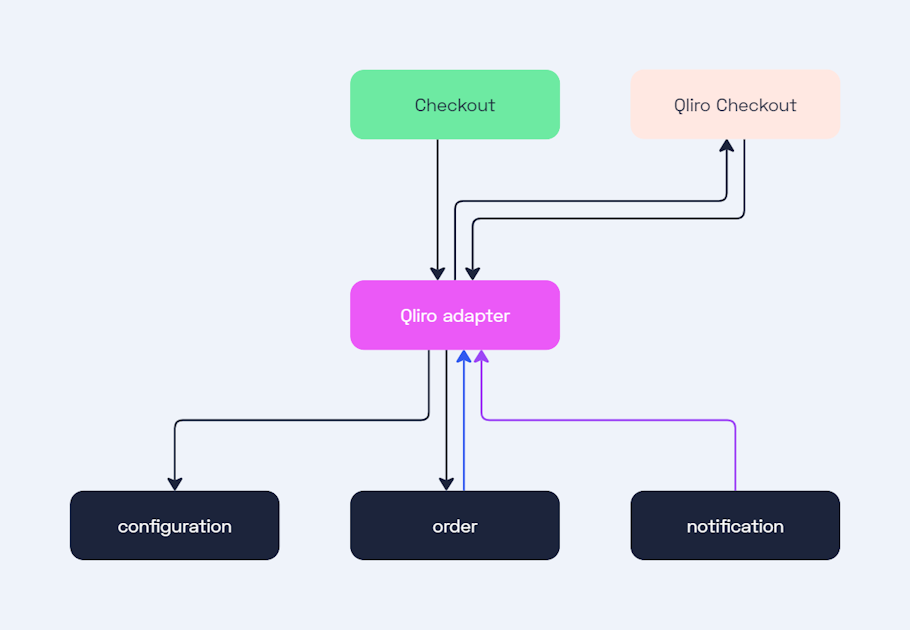
Configuration in Norce Admin
The adapter is configured using the following unique details obtained from Qliro:
| Field | Description | Example Value |
|---|---|---|
apiUrl | Qliro API URL (test or production). | https://pago.qit.nu |
merchantApiKey | Your Qliro merchant API key. | abc123 |
merchantApiSecret | Your Qliro merchant API secret. | xyz789 |
Optional Configuration
| Field | Description | Example Value |
|---|---|---|
recurring | Enable recurring payment tokens. | true |
useIntegratedShipping | Enable integrated shipping in Qliro. | true |
useUpsell | Enable upsell offers after checkout completion. Must also be enabled in your Qliro account. | true |
upsellTimeoutSeconds | Maximum time window (seconds) for upsell offers. Default: 300. | 300 |
loyaltyConfiguration | Enables the Qliro Loyalty Sign-up feature for Voyado or Klaviyo. See Qliro Loyalty Sign-up. | object |
primaryColor | Hex color for primary UI elements. | #FF5733 |
backgroundColor | Hex color for background. | #FFFFFF |
callToActionColor | Hex color for call-to-action buttons. | #00AA00 |
callToActionHoverColor | Hex color for call-to-action buttons on hover. | #008800 |
cornerRadius | Corner radius for UI elements (pixels). | 4 |
buttonCornerRadius | Corner radius for buttons (pixels). | 4 |
minimumCustomerAge | Minimum customer age requirement. When set, this also prevents the customer from authenticating as a company in Qliro. Leave unset or set to 0 to allow B2B/company checkout. | 18 |
requireIdentityVerification | Require BankID for Swedish customers. | true |
merchantConstraintName | Enables dynamic filtering of payment channels. | my-constraint |
Reference Source Configuration
| Field | Description | Example Value |
|---|---|---|
merchantReferenceSource | Source for merchant reference: OrderId or OrderCartReference. | OrderId |
mapDiscountPerRow | When true, discounts are embedded in item prices. When false, separate discount line items. | false |
useSkuAsIdentifier | When true, uses SKU as item reference. When false, uses item ID. | false |
shippingReferenceSource | Source for shipping reference: ShippingId or CustomValue. | ShippingId |
customShippingReference | Custom shipping reference value (when using CustomValue). | shipping-ref |
voucherReferenceSource | Source for voucher reference: VoucherId or CustomValue. | VoucherId |
customVoucherReference | Custom voucher reference value (when using CustomValue). | voucher-ref |
Redirect URLs Configuration
| Field | Description |
|---|---|
redirectUrls.checkoutUrl | URL to redirect back to checkout page. |
redirectUrls.confirmationUrl | URL to redirect after successful payment. |
redirectUrls.merchantTermsUrl | URL to merchant terms and conditions. |
redirectUrls.merchantIntegrityPolicyUrl | URL to merchant privacy/integrity policy. |
Consent Options
| Field | Description |
|---|---|
consentOptions.emailNewsletterSubscriptionConsentId | Consent ID for email newsletter subscription. |
Shipping Configuration
| Field | Description |
|---|---|
shippingConfiguration.provider | MerchantProvided, NShift, or Ingrid |
shippingConfiguration.unifaunCheckoutId | nShift checkout ID (when using NShift) |
Qliro API Environments
In addition to the generic Norce Adapter URLs (see Payment Adapters Overview), Qliro uses the following external API environments:
| Environment | Qliro API Base URL |
|---|---|
| Production | https://payments.qit.nu |
| Test | https://pago.qit.nu |
Create Payment
To get a Qliro Checkout HTML snippet, create a Qliro Checkout payment for an existing Norce order:
POST /api/checkout/v1/orders/{order_id}/payments
Host: {slug}.api-se.stage.norce.tech
x-merchant: {merchant}
x-channel: {channel}
Authorization: Bearer {token}
The response includes an HTML snippet containing a script tag that should be rendered on your checkout page. The script tag will load an iframe which guides the customer through the Qliro Checkout UI.
Example response:
{
  "paymentId": "pyTWfWFQDxIwodoImZHAfSsZvON",
  "htmlSnippet": "<script type=\"text/javascript\">...</script><div id=\"qliro-root\"></div>"
}
The adapter also updates your Norce order with the Qliro payment details. The payments[].id property represents the paymentId from the response, and payments[].reference contains the Qliro order ID.
Confirmation Page
When the payment has been confirmed, Qliro redirects the user to the confirmationUrl. You must also include the Qliro Checkout iframe on your confirmation page, as it shows important purchase details to the customer.
To display the confirmation page, retrieve the Qliro Checkout order and render the snippet:
GET /api/checkout/v1/orders/{order_id}/payments/{payment_id}
Host: {slug}.api-se.stage.norce.tech
x-merchant: {merchant}
x-channel: {channel}
Authorization: Bearer {token}
When the Qliro Checkout order is in the state of PurchaseCompleted, it will show a "thank you" page instead of the default purchase flow.
Creating a Recurring Payment
To create an order using a previously stored recurring token:
POST /api/checkout/v1/orders/{order_id}/payments/recurring
Host: {slug}.api-se.stage.norce.tech
x-merchant: {merchant}
x-channel: {channel}
Authorization: Bearer {token}
Content-Type: application/json

{
  "token": "3d2092a6-7baf-49e3-bd34-d0d0d85744b5"
}
The token is retrieved from a previous order where the customer completed a purchase with recurring payments enabled. To use recurring payments, merchants must activate this feature on both their Qliro merchant account (by contacting Qliro support) and in the Norce Qliro configuration by setting recurring: true.
Upsell
The upsell feature allows merchants to offer additional products to customers after they have completed their initial purchase. This is useful for subscription services, accessories, or related products.
To enable upsell:
- Enable
useUpsellin the adapter configuration - Ensure upsell is also enabled in your Qliro merchant account (contact Qliro support)
- Configure
upsellTimeoutSecondsto set the maximum time window for upsell offers (default: 300 seconds)
When an order is in the Accepted state and upsell is enabled, you can add items to the order. The adapter will call Qliro's upsell API to add the items to the existing payment. Once the upsell period expires or you explicitly complete the upsell, call the complete endpoint:
POST /api/checkout/v1/callback/orders/{order_id}/payments/{payment_id}/upsell/complete
Host: {slug}.api-se.stage.norce.tech
x-merchant: {merchant}
x-channel: {channel}
Authorization: Bearer {token}
This endpoint requires no request body. A successful response returns 200 OK with no content.
Gift Cards with Qliro Integrated Shipping
The Qliro Checkout Adapter sends vouchers (payments of type voucher, such as Awardit gift cards) to Qliro as one Discount row with a negative price. With integrated shipping (shippingConfiguration.provider is Ingrid or NShift) no shipping row is sent; Qliro adds the shipping cost itself. Qliro rejects order rows that sum below zero, so a gift card larger than the cart item total fails with NEGATIVE_ORDER_TOTAL_NOT_SUPPORTED and cannot be applied. Example: items 319 SEK, shipping 69 SEK, gift card 388 SEK gives rows of 319 − 388 = −69 SEK.
To let gift cards cover shipping with Qliro integrated shipping, ask Qliro merchant support to allow negative order totals on your Qliro merchant account (test and production). This setting is not available through the Qliro API or the Norce adapter configuration. Once enabled, Qliro offsets the negative rows against its own shipping cost: items 100 SEK, shipping 100 SEK, gift card 200 SEK results in a Qliro payment of 0 and the gift card capturing 200 SEK on completion.
Merchant-provided shipping is not affected, since the shipping row is included in the rows sent to Qliro.
Qliro Loyalty Sign-up
The Qliro Checkout Adapter supports Qliro's Loyalty Sign-up feature, which allows customers to enroll in a merchant's loyalty program directly inside the Qliro Checkout iframe. The adapter forwards a loyaltyConfiguration block to Qliro when the order is created, and Qliro renders the sign-up module for the supported provider:
- Voyado Engage — creates a contact (or updates an existing member) in Voyado.
- Klaviyo — creates or updates a profile in Klaviyo and adds it to one or more lists.
For a full description of the customer-facing flow, see Qliro's Loyalty Sign-up documentation.
Prerequisites for Qliro Loyalty Sign-up
Before configuring loyaltyConfiguration in the Qliro Checkout Adapter, ensure all of the following are in place:
- Qliro has activated the loyalty integration on your merchant account. Contact Qliro merchant solutions and provide:
- An SVG logo for the loyalty provider, displayed in the sign-up module.
- A provider API key (Voyado API key or Klaviyo private API key with
Profile,List, andSubscriptionfull-access permissions).
- The loyalty provider is fully configured.
- Voyado: the contact type and every consent ID referenced in
consents,memberConsents, andupdate.checkBoxesmust correspond to existing contact attributes of type Consent in your Voyado Engage tenant. See Finding Voyado consent IDs for how to locate them. - Klaviyo: every list referenced by name in
klaviyo.listsmust already exist in your Klaviyo account, and the email or SMS subscription channels you enable must be configured (sending domain verified, default sender set).
- Voyado: the contact type and every consent ID referenced in
- The customer's email address is available in the Qliro Checkout iframe. Qliro looks up the customer in the loyalty provider by email. If the email is not pre-filled by the merchant in
customerInformation.email, the customer must enter it in the iframe before Qliro can render the loyalty sign-up module.
Qliro Loyalty Configuration
The loyaltyConfiguration object is part of the qliro_checkout_adapter configuration. The adapter includes it in the Qliro order-creation request. Provide either a voyado block or a klaviyo block — not both.
Top-level fields
| Field | Description |
|---|---|
askForSignupChecked | Whether the loyalty sign-up checkbox is pre-checked in the checkout. |
merchantLoyaltyTermsUrl | URL to the merchant's loyalty program terms and conditions. |
merchantLoyaltyIntegrityPolicyUrl | URL to the merchant's loyalty program privacy/integrity policy. |
mainText | Primary text shown in the loyalty sign-up module. Object with title and description. |
secondaryTexts | Optional array of additional text blocks (title, description) shown alongside mainText. |
updateText | Object with title and description shown to existing members when prompted to update consents (Voyado only). |
voyado | Voyado-specific configuration. See Voyado configuration. |
klaviyo | Klaviyo-specific configuration. See Klaviyo configuration. |
Voyado loyalty configuration
The voyado block configures Qliro's interaction with Voyado Engage.
| Field | Description |
|---|---|
contactType | The Voyado contact type used when creating new contacts (for example Member or Contact). Must exist in Voyado Engage. |
consents | Array of Voyado consent IDs that Qliro sets on the contact when a new member signs up at checkout. Each ID must correspond to a contact attribute of type Consent in your Voyado Engage tenant. |
memberConsents | Array of Voyado consent IDs that Qliro checks to determine whether a contact is already a member. If the contact has all listed consents, Qliro treats them as an existing member and hides the sign-up module. Each ID must correspond to a contact attribute of type Consent in your Voyado Engage tenant. |
update | Object containing checkBoxes, an array of consent checkboxes shown to existing members. Each checkbox has isChecked, consentId, and label. Use together with the top-level updateText to render an update prompt for returning members. |
storeExternalId | Optional Voyado store external ID assigned to new contacts. |
Voyado Loyalty Sign-up member-detection behavior
When a customer enters their email in the Qliro Checkout iframe, Qliro looks up the email in Voyado Engage and decides what to display based on the contact's consent status:
| Scenario | What the customer sees |
|---|---|
| Customer is not found in Voyado. | Sign-up module is shown. If the customer opts in, Qliro creates a new contact in Voyado with the consents listed in consents. |
Customer is found in Voyado but is missing one or more of the consents listed in memberConsents. | Customer is treated as a non-member. Sign-up module is shown. If the customer opts in, Qliro updates the contact with the missing consents. |
Customer is found in Voyado and has all of the consents listed in memberConsents. | Customer is treated as an existing member. Sign-up module is not shown. |
Customer is found, has all memberConsents, and update.checkBoxes is configured. | Customer is treated as an existing member. Instead of the sign-up module, Qliro shows checkboxes for any additional consents the customer is missing (defined in update.checkBoxes). The updateText is displayed alongside these checkboxes. |
Finding Voyado consent IDs
The consent IDs used in consents and memberConsents must match the ID field of contact attributes with type Consent in Voyado Engage. To find these IDs:
- Open Voyado Engage and navigate to Settings > Contact attributes.
- Filter or scroll to attributes with Type: Consent (typically under Location: GDPR).
- Click the edit icon on a consent attribute to see its Id field.
Common Voyado consent attribute IDs include consentGeneralTerms, consentIntelligentOffers, and consentSegmentation. The exact IDs depend on your Voyado Engage tenant configuration.
Using an invalid or nonexistent consent ID (such as a placeholder like "consent-id") causes Qliro to never find a matching consent on the contact. This means the sign-up module is always shown, even for contacts that exist in Voyado.
Example Voyado configuration:
"loyaltyConfiguration": {
  "askForSignupChecked": true,
  "merchantLoyaltyTermsUrl": "https://example.com/loyalty/terms",
  "merchantLoyaltyIntegrityPolicyUrl": "https://example.com/loyalty/privacy",
  "mainText": {
    "title": "Become a member",
    "description": "Join our loyalty program to collect bonus points on every purchase."
  },
  "updateText": {
    "title": "Update your preferences",
    "description": "We'd like to keep you up to date on offers and news."
  },
  "voyado": {
    "contactType": "Member",
    "consents": ["consentGeneralTerms", "consentIntelligentOffers"],
    "memberConsents": ["consentGeneralTerms", "consentIntelligentOffers"],
    "update": {
      "checkBoxes": [
        {
          "isChecked": false,
          "consentId": "consentSegmentation",
          "label": "I want to receive personalized offers"
        }
      ]
    },
    "storeExternalId": "store-001"
  }
}
Klaviyo loyalty configuration
The klaviyo block configures Qliro's interaction with Klaviyo.
| Field | Description |
|---|---|
lists | Array of Klaviyo list names (not list IDs). Each list must already exist in Klaviyo. The profile is added to all listed lists on opt-in. |
useEmailSubscriptionChannel | If true, the profile subscribes to the email marketing channel on opt-in. Requires a verified sending domain and configured sender in Klaviyo. |
useSmsSubscriptionChannel | If true, the profile subscribes to the SMS marketing channel on opt-in. |
useSmsTransactionalChannel | If true, the profile subscribes to the SMS transactional channel on opt-in. |
Example Klaviyo configuration:
"loyaltyConfiguration": {
  "askForSignupChecked": true,
  "merchantLoyaltyTermsUrl": "https://example.com/loyalty/terms",
  "merchantLoyaltyIntegrityPolicyUrl": "https://example.com/loyalty/privacy",
  "mainText": {
    "title": "Join our newsletter",
    "description": "Sign up to receive exclusive offers."
  },
  "klaviyo": {
    "lists": ["Newsletter"],
    "useEmailSubscriptionChannel": true,
    "useSmsSubscriptionChannel": false,
    "useSmsTransactionalChannel": false
  }
}
Qliro Loyalty Sign-up Notifications
When a customer opts in or updates consents in the loyalty sign-up module, Qliro calls the adapter with one of the following push notifications:
| Notification type | Trigger |
|---|---|
LOYALTY_PROVIDER_MEMBER_CREATE | A new member or profile was created in the loyalty provider. |
LOYALTY_PROVIDER_MEMBER_UPDATE | An existing member or profile was updated. |
The adapter receives the full provider payload (Voyado contact or Klaviyo profile), maps it to a Norce loyalty record, and persists it on the Norce order at customer.loyalty. The persisted record contains:
id— the provider's identifier for the member or profile.provider—VoyadoorKlaviyo.attributes— an object containing:isMember—truewhen the Voyado contact hascontactTypeset toMemberandapprovedset totrue;falseotherwise (including all Klaviyo profiles).attributes— the provider's contact or profile fields (name, email, member number, bonus points, etc.).meta— provider metadata such as contact type, approval status, and timestamps.preferences— communication preferences returned by the provider.consents— consent records returned by the provider.
The notification is processed asynchronously; the loyalty data may not be present on the order immediately after the customer opts in.
Qliro Loyalty Sign-up Troubleshooting
The Qliro Loyalty Sign-up modal does not appear in the Qliro Checkout iframe.
Verify, in order:
- The order create request to Qliro includes a
loyaltyConfigurationobject with a non-nullvoyadoorklaviyoblock. If it is missing, check thatloyaltyConfigurationis set in theqliro_checkout_adapterconfiguration for the channel. - The customer has entered an email address in the Qliro Checkout iframe (or the merchant has pre-filled
customerInformation.email). Qliro cannot look up the customer in the loyalty provider without an email. - Qliro merchant solutions has activated the loyalty integration for your merchant API key, including the SVG logo and the provider API key.
The customer signs up but the profile or contact is not created in the loyalty provider.
- Klaviyo: confirm every list name in
klaviyo.listsexactly matches an existing list in Klaviyo (names are case-sensitive). Confirm the Klaviyo private API key supplied to Qliro hasProfile,List, andSubscriptionfull-access permissions. IfuseEmailSubscriptionChannelistrueand the list uses double opt-in, the profile is created but stays unsubscribed until the customer confirms via email. - Voyado: confirm the
contactTypeand every consent ID inconsentsandmemberConsentscorrespond to existing contact attributes of type Consent in the Voyado Engage tenant connected to Qliro. A common mistake is using placeholder consent IDs (such as"consent-id") that do not match any real attribute in Voyado. See Finding Voyado consent IDs.
The returning-member update flow is not shown to existing members.
The update flow requires both updateText (top level) and voyado.update.checkBoxes to be configured. Without both, Qliro shows the standard sign-up flow even for known members.
Synchronization Callbacks
The Qliro Checkout Adapter automatically handles synchronization between Qliro and Norce:
- Cart Changed: Qliro UI is suspended, order updated, then resumed
- Customer Update: Norce order updated with customer info from Qliro
- Shipping Option Update: Norce order updated with shipping selection
Idempotency and Retries
Qliro's checkout system uses idempotency to ensure that repeated identical requests have the same effect. This is important for retry scenarios and webhook handling. Please read the Qliro Checkout documentation on Idempotency and retries for detailed information.
Troubleshooting (Qliro Specific)
In addition to the generic troubleshooting steps:
- Review the order status in Qliro's merchant portal.
- If Capture fails, verify the Norce order is in the reserved state.
- Use the refresh endpoint to update available payment actions:
POST /api/order/v1/orders/{order_id}/payments/{payment_id}/refresh
Host: {slug}.api-se.stage.norce.tech
x-merchant: {merchant}
x-channel: {channel}
Authorization: Bearer {token}
Common Errors
- 409 Conflict: A payment already exists for this order.
- Validation Fails: Check stock availability and discount validity.
- Capture Fails: Order must be in
reservedstate.
Error: "NEGATIVE_ORDER_TOTAL_NOT_SUPPORTED - Order can not have negative price"
Qliro Checkout Error (HTTP 400): NEGATIVE_ORDER_TOTAL_NOT_SUPPORTED - Order can not have negative priceReturned as Norce Checkout error code qliro-bad-request. A gift card exceeds the cart item total on a channel with Qliro integrated shipping, so the rows sent to Qliro sum below zero and the change is rolled back. Fix: ask Qliro to allow negative order totals on the merchant account. See Gift Cards with Qliro Integrated Shipping.