Pricing priorities in Norce
Norce Commerce offers a range of functionalities that has to work together to determine the correct price for a customer, under specific conditions and at a specific time.
Here is an overview of how they work together:
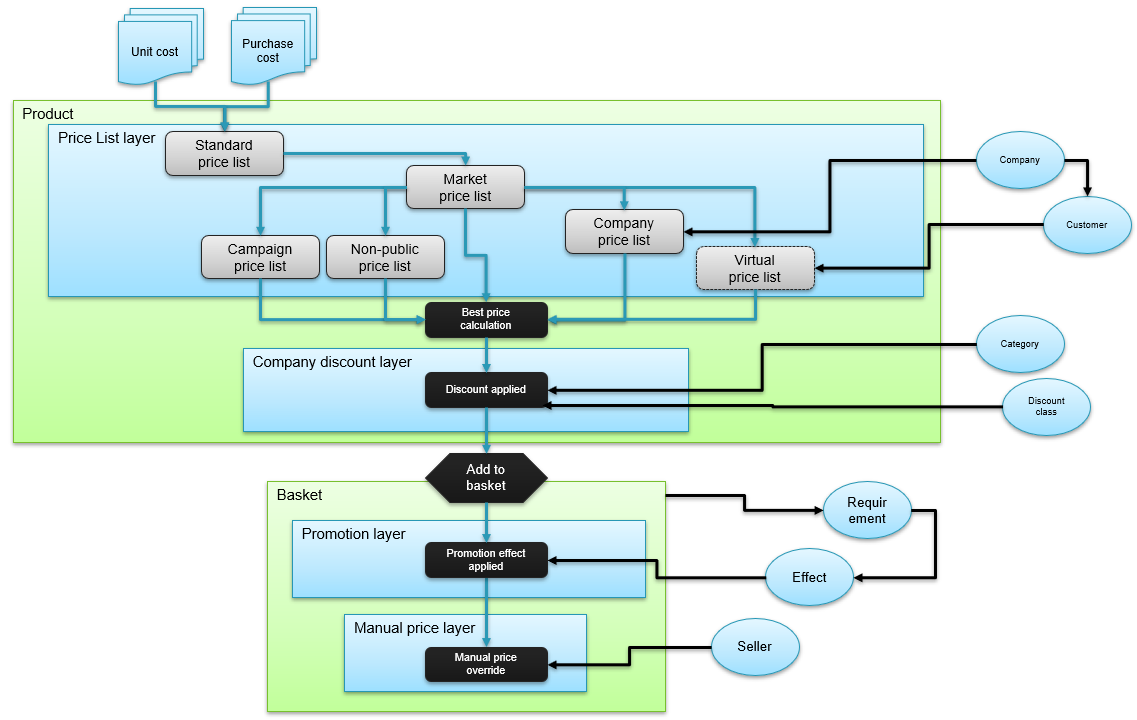
Price list layer
Standard price lists, market price lists, campaign price lists, customer specific-, virtual- and non-public price lists are all evaluated for each request. All the price lists that are allowed to be used are calculated, and the best price (for the customer) is passed to the next layer.
Company discount layer
Once the best price is calculated, the company discount is applied (if it exists). This is a percentage rebate on top of the best price calculation done earlier.
Company discounts are configured per company and evaluated after best-price selection. Key behaviors:
- The rebate applies to the best price regardless of which price list produced it — not only company price lists.
- If multiple rules match a product (by category or flag), the rule giving the highest rebate is applied.
- A discount can be scoped to a specific price list type — in that case the rebate is only applied when the best price came from a price list of that type.
- Negative values are allowed (price uplift).
- The maximum value is 100%. Rules that would produce a negative price are ignored.
The result after this layer is a product's final price. No other price changes are applied on products after this.
Promotion layer (Basket)
The next time the price can be changed is when a product is added to a basket, where the promotion logic is automatically applied. In addition to price discounts, promotions can also include other effects like free products or reduced shipping fees. These changes are applied in Norce's memory every time a basket is fetched, and become permanent and saved to the database only when an order has been created.
Manual price layer (Basket row)
The last way to override all previously applied pricing is to update basket rows with manually set prices, which can be done from the front-end application. Norce locks in these manual prices so that no other pricing changes are applied when the row is processed as part of an order.
Exclusive price lists
Price lists connected to a customer or company can be marked as exclusive. An exclusive price list overrides the normal best-price evaluation — it wins over all other eligible price lists for both price and assortment.
Rules:
- If a customer or company has at least one exclusive price list, only those exclusive lists are used. All public, PriceListSeed, and non-exclusive customer/company lists are ignored.
- Among multiple exclusive price lists on the same entity, normal best-price logic still applies.
- If both the customer and the company have exclusive price lists, the company's exclusive lists win — the customer's are ignored.
- Company discounts still apply after the exclusive price list has produced its price.
Exclusive price lists are appropriate when a specific agreement must be honored with no possibility of a campaign or public price overriding it — and when the assortment must also be locked to what is on the agreement.